


Why is my CSH2 not charging or providing power to the Microsoft Surface Hub?
Issue: The APC Smart-UPS Charge Mobile Battery is not charging, or the connected Microsoft Surface Hub cannot be turned on.
Product Line: CSH2
Potential Cause: The mobile frame may be moved when the system is operating on battery mode, and the CSH2 is disconnected from AC input. In some cases, the AC input cable, or AC output cable connected to the CSH2 may become dislodged or disconnected. This may not be obvious as first glance, because the CSH2 is covered when installed in the battery tray of the mobile frame.
Resolution:
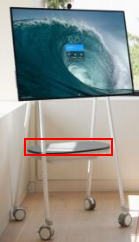
Step 1: Remove the top cover of the battery tray:
Step 2: Ensure all cables are securely connected to the CSH2: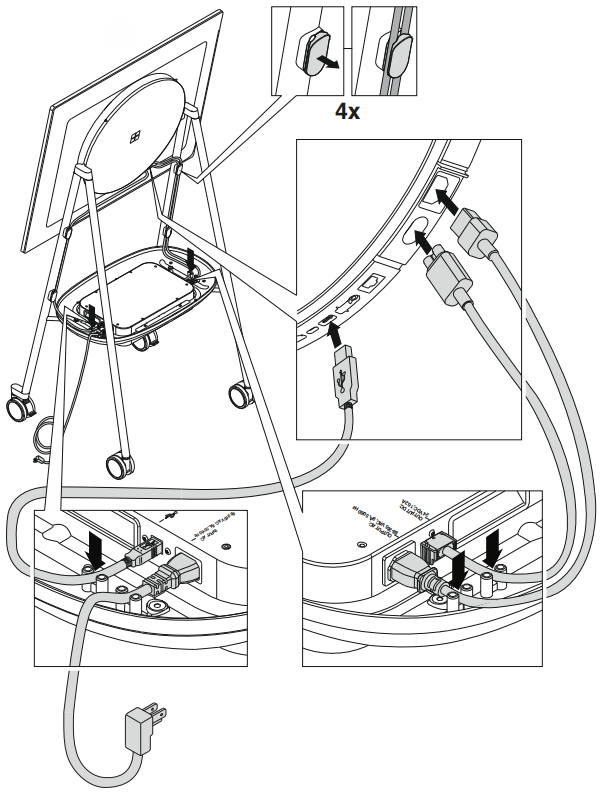
Step 3: Reinstall the top cover of the battery tray.
Note:
Product Line: CSH2
Potential Cause: The mobile frame may be moved when the system is operating on battery mode, and the CSH2 is disconnected from AC input. In some cases, the AC input cable, or AC output cable connected to the CSH2 may become dislodged or disconnected. This may not be obvious as first glance, because the CSH2 is covered when installed in the battery tray of the mobile frame.
Resolution:
Step 1: Remove the top cover of the battery tray:
Step 2: Ensure all cables are securely connected to the CSH2:
- AC Input Power Cord
- DC Output Cable
- AC Pass Through Output Cable
- USB Cable
Step 3: Reinstall the top cover of the battery tray.
Note:
- If the CSH2 battery is completely discharged, and the CSH2 is reconnected to AC input, the DC output will require 5 minutes to turn on.
- If the DC output was turned on before the system discharged, it will turn on automatically after 5 minutes of being reconnected to available AC input.
- With AC input connected, while the DC output is off, the CSH2 is in Standby operation: all the LEDs are off, and Battery State of Charge is communicated to the Surface Hub as 0%. This does not mean that the battery is not charging – Battery State of Charge will be communicated to the Surface Hub once the CSH2 DC output turns on.