How to freeze the numbering of the functional marks in order to modify the SLD without modifying the existing functional marks in eDesign Small Building Application
Issue: Freezing the functional marks under Single Line Diagram
Product Line: eDesign Small Building https://edesign-630.se.com/
Cause: Need to freeze functional marks to modify Single Line Diagram without modifying existing functional marks
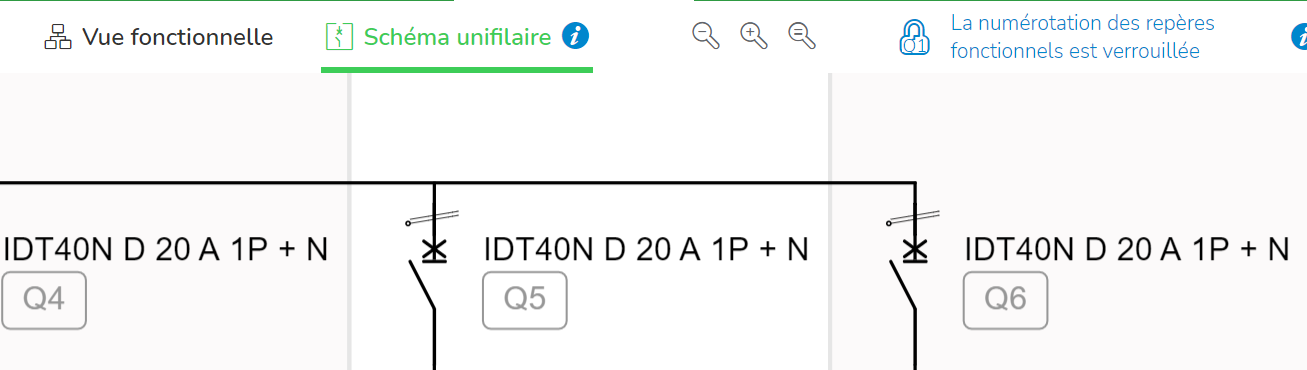
Resolution : A locking button located at the top right of the screen allows to freeze the numbering. The numbers of the new functional marks will be added to the last number created before the locking, whatever the position is in the Single line diagram.
After unlocking, all the functional marks are automatically redesigned according to numbering principle.
Product Line: eDesign Small Building https://edesign-630.se.com/
Cause: Need to freeze functional marks to modify Single Line Diagram without modifying existing functional marks
Resolution : A locking button located at the top right of the screen allows to freeze the numbering. The numbers of the new functional marks will be added to the last number created before the locking, whatever the position is in the Single line diagram.
After unlocking, all the functional marks are automatically redesigned according to numbering principle.