


How to download and install Machine Experts Offline Medium?
Issue:
How to download and install Machine Experts Offline Medium?
Product Line:
Machine Expert
Resolution:
To download Machine Expert's installer and offline medium, you will need an internet connection. But this allows you to install the software at a later date without an internet connection.
1. Download the installer file from Schneider Electrics website Here
2. Unzip and install the "Schneider Electric Software Installer"
3. Open the software installer and in the top right, click on the crossed tools and select the "Download Full Software Version"
How to download and install Machine Experts Offline Medium?
Product Line:
Machine Expert
Resolution:
To download Machine Expert's installer and offline medium, you will need an internet connection. But this allows you to install the software at a later date without an internet connection.
1. Download the installer file from Schneider Electrics website Here
2. Unzip and install the "Schneider Electric Software Installer"
3. Open the software installer and in the top right, click on the crossed tools and select the "Download Full Software Version"
4. Select which version of the software you want to download and click "Download Full Software"
5. This will download the entire software, features for both the standard and professional license.
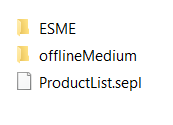
6. Once it is fully downloaded, you will end up with the following:
5. This will download the entire software, features for both the standard and professional license.
6. Once it is fully downloaded, you will end up with the following:
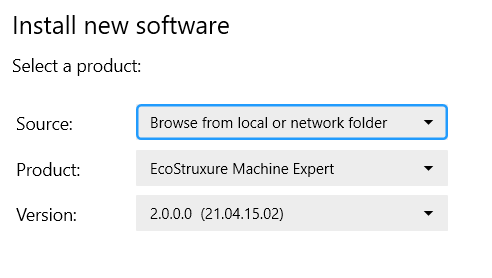
7. When you are ready to install the software, open up the Schneider Electric Software Installer and select "Install new software"
8. Change the "Source" from Online to Browse for local folder and point to the "ProductList.sepl" within the offline medium download folder.
9. This will select the version you downloaded the offline medium for.
8. Change the "Source" from Online to Browse for local folder and point to the "ProductList.sepl" within the offline medium download folder.
9. This will select the version you downloaded the offline medium for.
10. Click Next and follow the prompts on the screen for install.
11. Once the download is complete, activate the software using your Activation ID in the license manager.
11. Once the download is complete, activate the software using your Activation ID in the license manager.