


Crystal Reports Driver
This Crystal Reports installation process will only work If you have already created a report and you want to generate, display, and export it. What you simply need is the Crystal Report Driver (components).
However, to edit or create a Crystal Reports, you need Crystal Reports software installed and licensed. To purchase the software from the Crystal Reports company called SAP (Crystal Reports is owned by SAP), contact your local rep. for help. Please note that SAP is a separate vendor and is not part of Schneider Electric products.

Please note that this is for Crystal Reports driver installation only.
To install Crystal Reports Driver, see screenshots below:
-Control Panel ->Programs and Features

Right click Geo SCADA Expert 2021(base on your version) and select CHANGE from the list.

Select MODIFY to makes changes

Select the Crystal Reports as indicated in the image
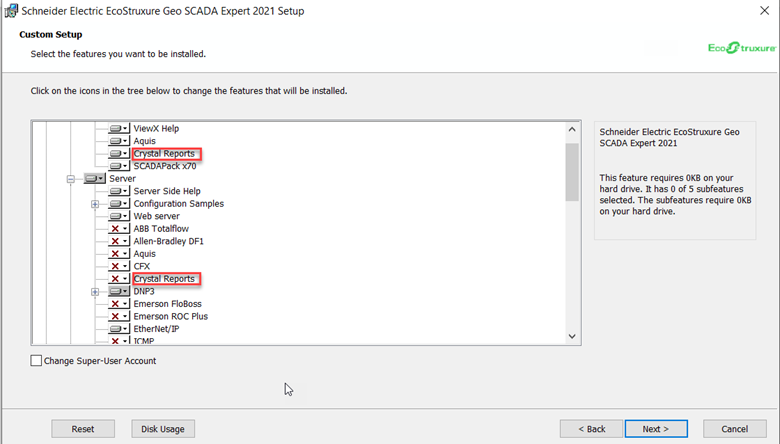
Click INSTALL to start installation process

Once the installation process is completed, click finish to exit.
However, to edit or create a Crystal Reports, you need Crystal Reports software installed and licensed. To purchase the software from the Crystal Reports company called SAP (Crystal Reports is owned by SAP), contact your local rep. for help. Please note that SAP is a separate vendor and is not part of Schneider Electric products.
Please note that this is for Crystal Reports driver installation only.
To install Crystal Reports Driver, see screenshots below:
-Control Panel ->Programs and Features
Right click Geo SCADA Expert 2021(base on your version) and select CHANGE from the list.
Select MODIFY to makes changes
Select the Crystal Reports as indicated in the image
Click INSTALL to start installation process
Once the installation process is completed, click finish to exit.
發佈於: 施耐德電機Taiwan
需要協助?
產品選型工具
快速輕鬆地為您的應用找到合適的產品和附件。
取得報價
立即線上提交您的銷售需求,專業團隊將主動聯繫您。
購買地點
輕鬆在您所在地區找到最近的施耐德電機經銷商。
支援中心
在同一位置找到滿足您所有需求的支援資源。