


How to gain access to the APV9602 card if you forgot its password?
Product Line:
Easy UPS LI SNMP Manager, APV9602, APVS9602
Environment:
Any SMV UPS with APV9602 and APVS9602 and supported Windows OS
Cause:
Forgotten the password to access the SNMP card through the software.
Resolution:
How to know the current password of the SNMP Card (APV9602)?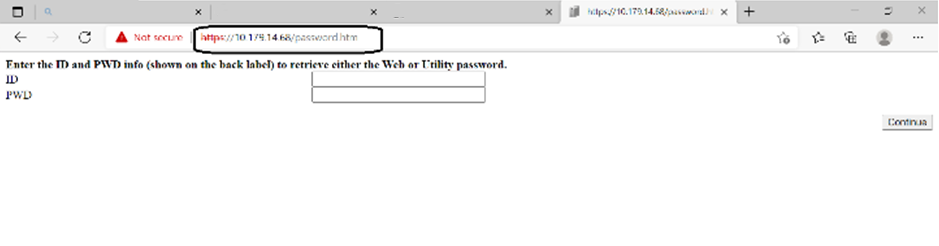
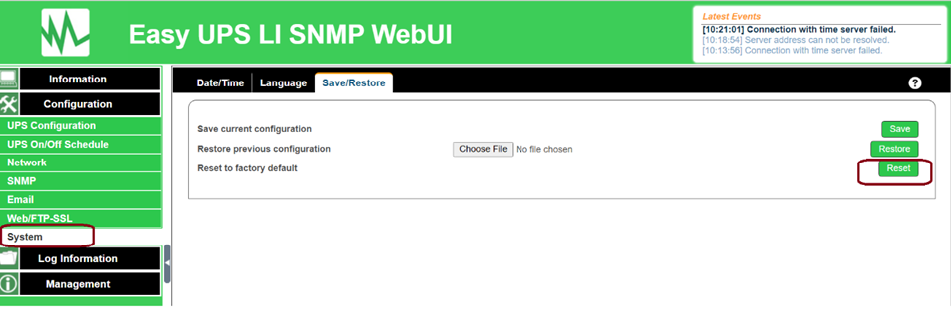
How to reset the SNMP (APV9602) password?:
Easy UPS LI SNMP Manager, APV9602, APVS9602
Environment:
Any SMV UPS with APV9602 and APVS9602 and supported Windows OS
Cause:
Forgotten the password to access the SNMP card through the software.
Resolution:
How to know the current password of the SNMP Card (APV9602)?
- Insert APV9602/APVS9602 card and install Easy UPS LI SNMP Manager.
- Once the card is detected, launch the SNMP Web UI.
- To know the current password of the UI, access the following web page: https://<SNMP Card IP address>/password.htm
- Login to the web page, using the following credentials: ID: admin, PWD: written on the SNMP card sticker, and click continue to show the current username and password and note it down.
How to reset the SNMP (APV9602) password?:
- Insert APV9602/APVS9602 card and install Easy UPS LI SNMP Manager.
- Once the card is detected, log in to the SNMP Web UI.
- Navigate to Configuration->System->Save/Restore, and under the "save/restore" tab, click on the Reset button to reset the SNMP card to factory defaults.
- The SNMP page will restart and login to the SNMP Web UI and revert to the factory default credentials: (administrator/administrator).
- After logging in with the factory default credentials, set the new credentials and apply them after the software asks you to change them.