


PowerChute cannot register with Network Management Card/s and report a security certificate rejection.
Issue:
PowerChute cannot register with all Network Management Cards due to the rejection of the security certificate.
Product:
PowerChute Network Shutdown v5
Environment:
All support OS
Cause:
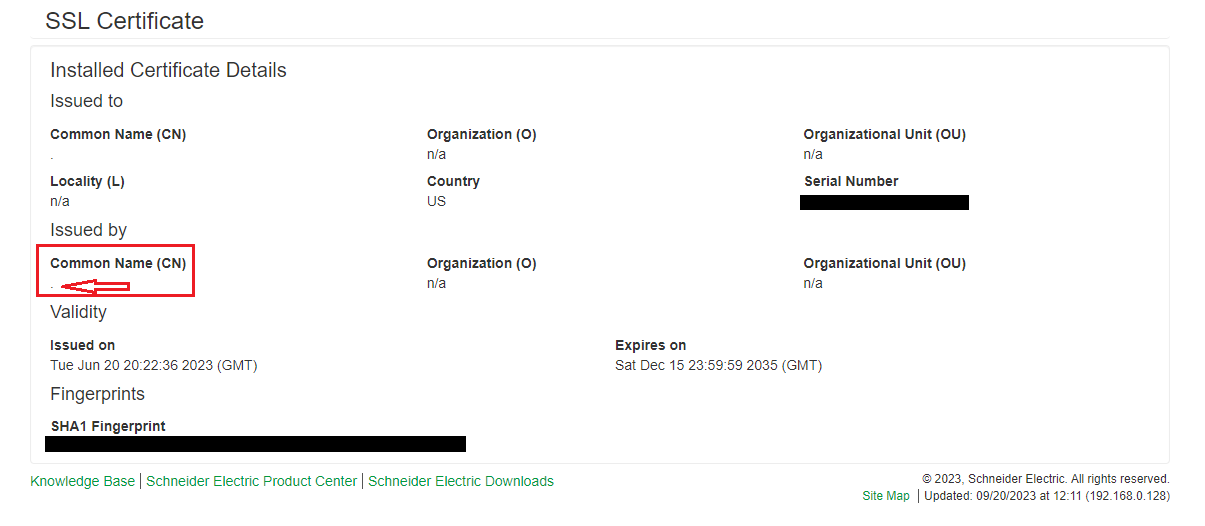
The Common Name (CN) values on the Network Management Cards SSL certificate CN value may be set to “.” (Period) by default on new NMCs.
To view the Network Management Card (NMC) security information, log into the Network Management Card and go to Configuration > Network > Web > SSL Certificate > Validate certificate.
Solution:
Use the Network Management Card Security Wizard to create and upload a new SSL certificate or generate a new self-signed certificate on the Network Management Card. In the Network Management Card UI, navigate to Configuration > Network > Web > SSL Certificate and select the option to remove the existing certificate. This will reboot the NMC and generate a new self-signed certificate with the CN value updated to use the Network Management Cards IP address or hostname.
PowerChute cannot register with all Network Management Cards due to the rejection of the security certificate.
Product:
PowerChute Network Shutdown v5
Environment:
All support OS
Cause:
The Common Name (CN) values on the Network Management Cards SSL certificate CN value may be set to “.” (Period) by default on new NMCs.
To view the Network Management Card (NMC) security information, log into the Network Management Card and go to Configuration > Network > Web > SSL Certificate > Validate certificate.
Solution:
Use the Network Management Card Security Wizard to create and upload a new SSL certificate or generate a new self-signed certificate on the Network Management Card. In the Network Management Card UI, navigate to Configuration > Network > Web > SSL Certificate and select the option to remove the existing certificate. This will reboot the NMC and generate a new self-signed certificate with the CN value updated to use the Network Management Cards IP address or hostname.
發佈於: 施耐德電機Taiwan

需要協助?
產品選型工具
快速輕鬆地為您的應用找到合適的產品和附件。
取得報價
立即線上提交您的銷售需求,專業團隊將主動聯繫您。
購買地點
輕鬆在您所在地區找到最近的施耐德電機經銷商。
支援中心
在同一位置找到滿足您所有需求的支援資源。