


Device is not logging any values, but vista/ web app shows real time data
Issue description:
PME lost the communication to the device and later the device got connected to the Management Console. The vista page/ web app can show the real time value, but the device is not logging any data.
Environment:
Power Monitoring Expert- Designer
Issue:
The Log Source register within the Log Acquisition module was configured to receive only input logs, causing the module to exclusively read log registers directly linked to its input logs.
Solution:
The Log Acquisition module is responsible for gathering information from field devices. The Log Source register determines the configuration mode of the Log Inserter by specifying the logs to be read.
When set to "ALL," this register enables the module to read all logs within the system, automatically including new logs as devices are incorporated into the Power Monitoring Expert system.
To adjust the setup register options, follow these steps:
1. Launch the Log Acquisition module within Designer.
2. Double-click on the Log Source register to access its settings.
3. If the register is currently set to "input logs," manually modify it to "ALL."
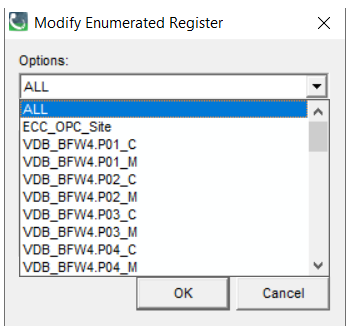
4. Save the changes, and the device will commence logging data.
PME lost the communication to the device and later the device got connected to the Management Console. The vista page/ web app can show the real time value, but the device is not logging any data.
Environment:
Power Monitoring Expert- Designer
Issue:
The Log Source register within the Log Acquisition module was configured to receive only input logs, causing the module to exclusively read log registers directly linked to its input logs.
Solution:
The Log Acquisition module is responsible for gathering information from field devices. The Log Source register determines the configuration mode of the Log Inserter by specifying the logs to be read.
When set to "ALL," this register enables the module to read all logs within the system, automatically including new logs as devices are incorporated into the Power Monitoring Expert system.
To adjust the setup register options, follow these steps:
1. Launch the Log Acquisition module within Designer.
2. Double-click on the Log Source register to access its settings.
3. If the register is currently set to "input logs," manually modify it to "ALL."
4. Save the changes, and the device will commence logging data.