


ATV320 FDR error 3 or 4 when using Machine Expert 2.x
FDR stands for Fast Device Replacement and it is responsible for backup and restore all driver's parameters inside the controller.
If a device is replaced, the service automatically configures the replacement device with parameters identical to those of the removed device. For that, a FTP session is created and managed between controller and device to transfer the parameters' files.
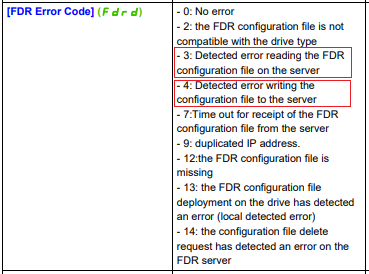
Since Machine Expert 2.x, FTP service is encrypted by default, being incompatible with ATV320 and legacy offers, resulting in failure during file transfer process, described on Altivar Machine ATV320 - Modbus TCP - EtherNet/IP Manual - VW3A3616
To enable unencrypted FTP communication and for that, allow FDR working properly, a post configuration parameter must be included via webpage.
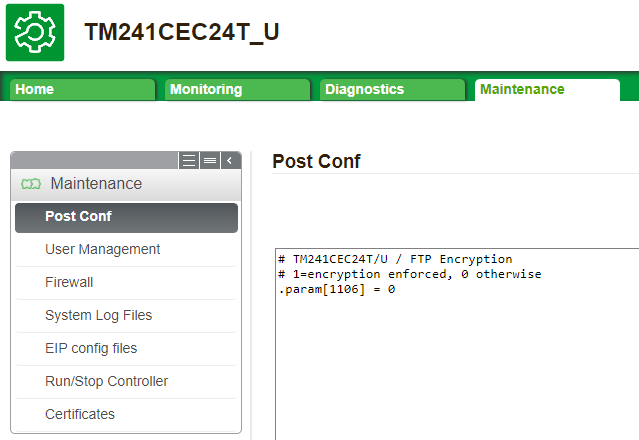
The example below shows how to include on M241, but same parameter should be use on M251 or M262 as well.
Notes:
-Using Machine Expert 2.x, on menu Build -> PostConfiguration -> Generated... user can create/modify and copy as text.
-A controller reboot is needed after setting the parameter.
-The complete FDR settings and procedure can be found on FA329116
If a device is replaced, the service automatically configures the replacement device with parameters identical to those of the removed device. For that, a FTP session is created and managed between controller and device to transfer the parameters' files.
Since Machine Expert 2.x, FTP service is encrypted by default, being incompatible with ATV320 and legacy offers, resulting in failure during file transfer process, described on Altivar Machine ATV320 - Modbus TCP - EtherNet/IP Manual - VW3A3616
To enable unencrypted FTP communication and for that, allow FDR working properly, a post configuration parameter must be included via webpage.
The example below shows how to include on M241, but same parameter should be use on M251 or M262 as well.
Notes:
-Using Machine Expert 2.x, on menu Build -> PostConfiguration -> Generated... user can create/modify and copy as text.
-A controller reboot is needed after setting the parameter.
-The complete FDR settings and procedure can be found on FA329116