


How to set sensitivity for BACK_UPS Pro Gaming Battery Back up (BGM2200B-MSX)
Issue:
How to set sensitivity for BACP UPS PRO Gaming Back up (BGM2200B-MSX)?
Product Line:
Back-UPS Pro Gaming Back up (BGM2200B-MSX)
Environment:
All Serial Numbers
Cause:
There are times that the sensitivity settings need to be changed due to the actual condition of the main source/utility in order to keep the UPS operation smooth and normal.
Resolution/Procedure:
1. Press and hold the MENU button then wait until the beep was heard then release, the default or previous sensitivity settings will appear "Medium".
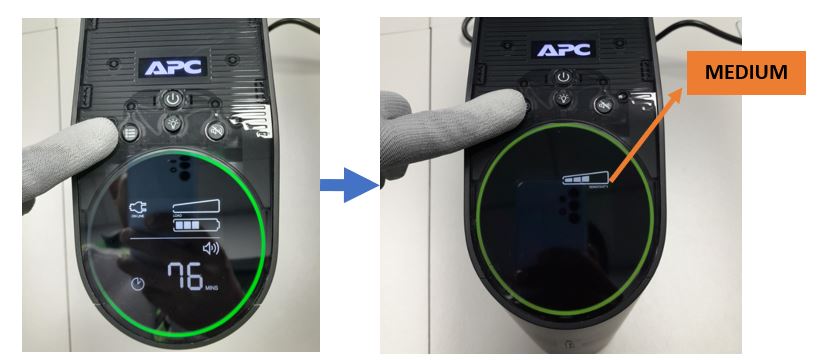
2. Press the MENU button quickly which will not last more than 3 seconds interval to continuously change the sensitivity settings. Another press with less than 3 seconds will allow you to switch to another sensitivity settings.
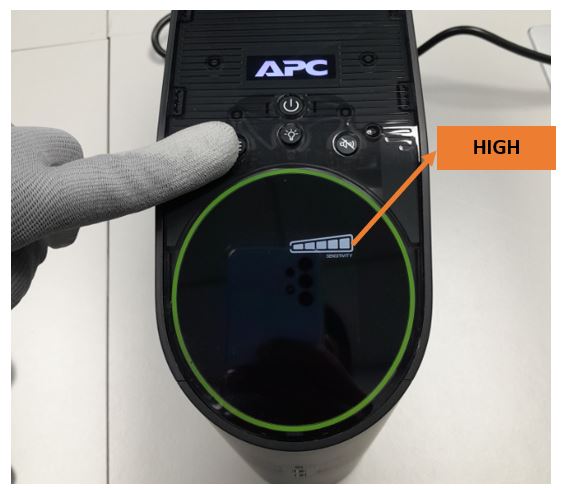
3. Repeatedly pressing the MENU button which will not last more than 3 seconds interval .

4. Please leave or do not press the MENU button if the last sensitivity settings is selected (LOW, MEDIUM or HIGH)
How to set sensitivity for BACP UPS PRO Gaming Back up (BGM2200B-MSX)?
Product Line:
Back-UPS Pro Gaming Back up (BGM2200B-MSX)
Environment:
All Serial Numbers
Cause:
There are times that the sensitivity settings need to be changed due to the actual condition of the main source/utility in order to keep the UPS operation smooth and normal.
Resolution/Procedure:
1. Press and hold the MENU button then wait until the beep was heard then release, the default or previous sensitivity settings will appear "Medium".
2. Press the MENU button quickly which will not last more than 3 seconds interval to continuously change the sensitivity settings. Another press with less than 3 seconds will allow you to switch to another sensitivity settings.
3. Repeatedly pressing the MENU button which will not last more than 3 seconds interval .
4. Please leave or do not press the MENU button if the last sensitivity settings is selected (LOW, MEDIUM or HIGH)