


How to back up and clear ION Setup Network Configuration?
Answer
Issue
How to back up and clear ION Setup Network Configuration?
_____________________________________________________________
Product Line
ION Setup
_____________________________________________________________
Environment
ION Setup Network Configuration
_____________________________________________________________
Solution
ION Setup is a configuration tool that provides an intuitive environment for setting up and verifying settings on PowerLogic meters and other devices.
In some applications, where ION Setup has full list of devices which does not accept additional devices or ION Setup is unable to establish communication with a newly configured device despite the correct configuration, resetting ION Setup provides the option to obtain a clean ION Setup without reinstalling it, allowing for device connection.
*Warning: Take backups of any files prior to modifying them. Ensure the backups are in a location that will not be overwritten (i.e. the Desktop).*
It is as always recommended using the latest version of ION Setup available on SE website.
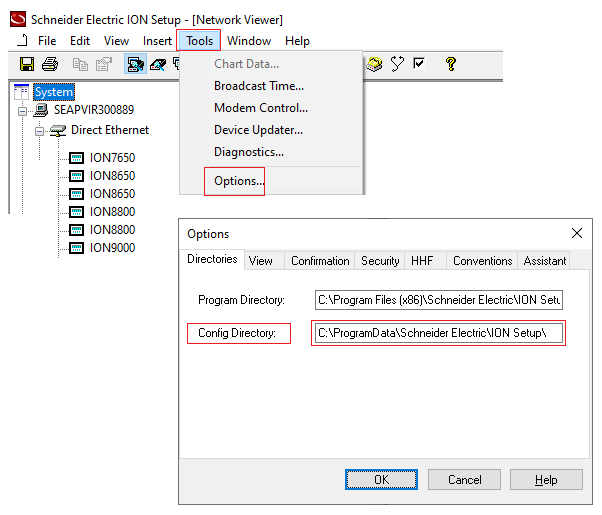
Here are the steps to back up configurations before making any changes:
Here are the steps to clear or reset ION Setup Network Configuration:
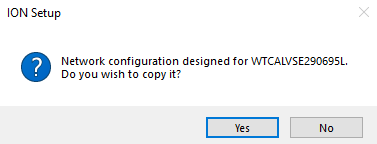
"Network Configuration designed for *previous server name*. Do you wish to copy it?"
Select YES, and it will utilize the copied configuration files.
Issue
How to back up and clear ION Setup Network Configuration?
_____________________________________________________________
Product Line
ION Setup
_____________________________________________________________
Environment
ION Setup Network Configuration
_____________________________________________________________
Solution
ION Setup is a configuration tool that provides an intuitive environment for setting up and verifying settings on PowerLogic meters and other devices.
In some applications, where ION Setup has full list of devices which does not accept additional devices or ION Setup is unable to establish communication with a newly configured device despite the correct configuration, resetting ION Setup provides the option to obtain a clean ION Setup without reinstalling it, allowing for device connection.
*Warning: Take backups of any files prior to modifying them. Ensure the backups are in a location that will not be overwritten (i.e. the Desktop).*
It is as always recommended using the latest version of ION Setup available on SE website.
Here are the steps to back up configurations before making any changes:
- In latest versions of ION Setup(Builds 3.2 and Later), select File > Export Network and save the .csv file that contains the network configuration. The .csv file can be imported again to an existing or new installed ION Setup(by selecting File > Import Network).
- Copy the 3 DAT files (IONSetup.DAT, SITEINFO.DAT, and DEVINFO.DAT) from "Config directory" (e.g. Navigate to C:\ProgramData\Schneider Electric\ION Setup) in a secure location.
Here are the steps to clear or reset ION Setup Network Configuration:
- Close the ION Setup program: Select File > Exit.
- Navigate to Config folder C:\ProgramData\Schneider Electric\ION Setup and remove all 3 backed up DAT files(IONSetup.DAT, SITEINFO.DAT, and DEVINFO.DAT).
- Open ION Setup program. It appears as a fresh install that does not have any added sites or devices.
- Now add the device in question that previously ION Setup was not able to communicate or ION Setup was not able to accept additional device.
- When the device is configured and set up properly, exit the ION Setup program.
- Copy the 3 DAT files(IONSetup.DAT, SITEINFO.DAT, and DEVINFO.DAT) that were backed up previously and paste them to the Config folder C:\ProgramData\Schneider Electric\ION Setup) which will recreate the all previous added sites and devices.
"Network Configuration designed for *previous server name*. Do you wish to copy it?"
Select YES, and it will utilize the copied configuration files.