


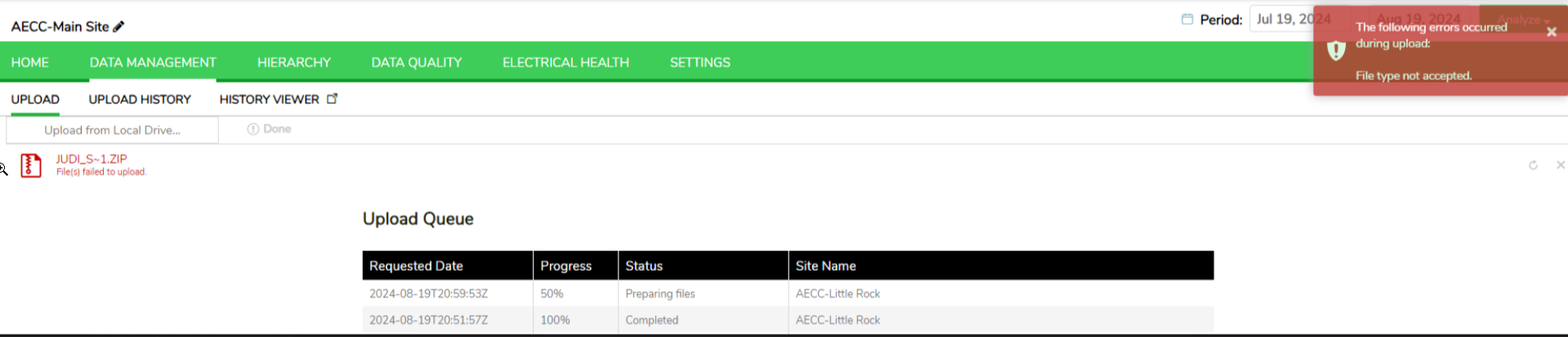
Upload Failure from OneDrive - UI Displays Tilde (~) in the File Name
Issue Description:
Users may encounter an issue where attempting to upload files from OneDrive to Power Advisor (PA) results in failure. The PA UI may display a tilde (~) in the file name, indicating an error.
Root Cause:
This issue can be attributed to several factors:
To resolve this issue, follow these steps:
Users may encounter an issue where attempting to upload files from OneDrive to Power Advisor (PA) results in failure. The PA UI may display a tilde (~) in the file name, indicating an error.
Root Cause:
This issue can be attributed to several factors:
- Internet Connection: Unstable or slow internet connections can disrupt the upload process, especially for larger files.
- OneDrive Sync Status: If OneDrive is not fully synced, pending syncs can interfere with the upload process. Here’s a helpful guide from Microsoft Support on how to work offline with OneDrive: Working offline with OneDrive1.
- Timeouts: Larger files take longer to upload, increasing the likelihood of timeouts or interruptions.
To resolve this issue, follow these steps:
- Download the File Locally: Download the file from SharePoint to your local drive.
- Upload from Local Drive: Upload the file to PA from your local drive. This bypasses potential issues with OneDrive sync and internet stability.