


How can we help you today?
How TelePACE Studio can save values (set points) from SCADAPack and then to restore them?
1. Read program from SCADAPack
2. Go in “Monitor” mode
3. Add registers that you want to save to Register Editor with Always in “Availability” field.
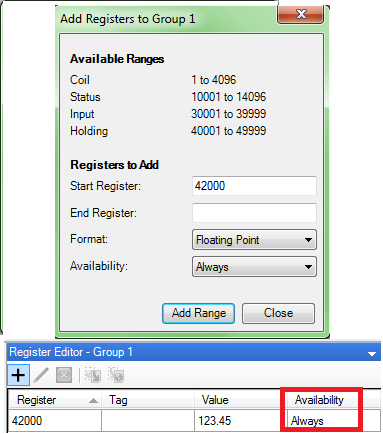
4. Go offline
5. Read program from SCADAPack
6. Save and close the program
To test if values are saved do following:
1. Cold boot or initialize ScADAPack from TelePACE studio
2. Open TelePACE file with saved values
3. Write the program to SCADAPack
4. Observe that saved values are written into the modbus registers.
2. Go in “Monitor” mode
3. Add registers that you want to save to Register Editor with Always in “Availability” field.
4. Go offline
5. Read program from SCADAPack
6. Save and close the program
To test if values are saved do following:
1. Cold boot or initialize ScADAPack from TelePACE studio
2. Open TelePACE file with saved values
3. Write the program to SCADAPack
4. Observe that saved values are written into the modbus registers.
Released for: Schneider Electric USA
Explore more
Range:

Explore more
Range:
Need help?
Product Selector
Quickly and easily find the right products and accessories for your applications.
Get a Quote
Start your sales inquiry online and an expert will connect with you.
Where to buy?
Easily find the nearest Schneider Electric distributor in your location.
Help Center
Find support resources for all your needs, in one place.