


How can we help you today?
UI alignment issues for few optional fields for EPC-m for iOS devices
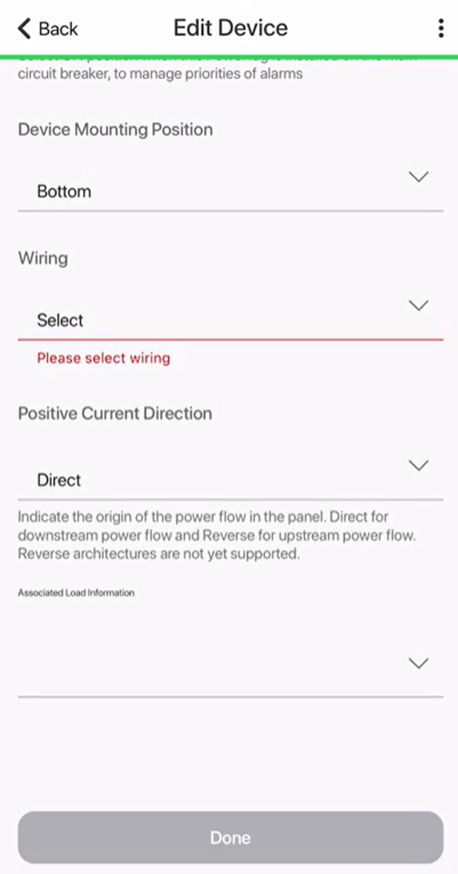
Sometimes you might see UI alignment issues for few optional fields on EcoStruxure Power Commissioning Mobile application when configuring a Power Tag device. The issue is specifically for the fields “Usage” and “Building Zone” which are under the header “Associated Load Info” for Power Tag and OFSD devices.
You might see the issue as shown in below Pic 1, where you cannot see the Usage and Building Zone and the header “Associated Load Information” font is very small.
Pic 1
Work Around: Please change the Text size in your iOS device to 2 and above.
For that changes, please navigate to Settings > Accessibility, then select Display & Text Size.
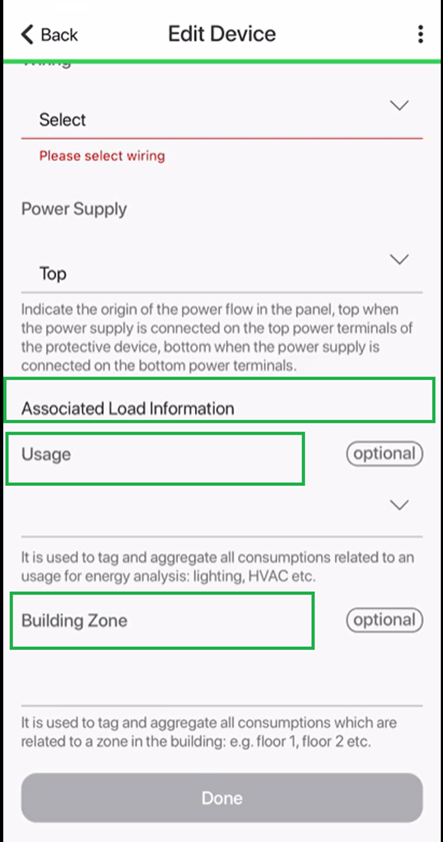
Click on Text size and slide the bar to 2 and above. Once these changes are done, you can see those optional fields as highlighted in green in Pic 2
Pic 2
You might see the issue as shown in below Pic 1, where you cannot see the Usage and Building Zone and the header “Associated Load Information” font is very small.
Pic 1
Work Around: Please change the Text size in your iOS device to 2 and above.
For that changes, please navigate to Settings > Accessibility, then select Display & Text Size.
Click on Text size and slide the bar to 2 and above. Once these changes are done, you can see those optional fields as highlighted in green in Pic 2
Pic 2
Released for: Schneider Electric USA
Explore more
Product:
Range:

Explore more
Product:
Range:
Need help?
Product Selector
Quickly and easily find the right products and accessories for your applications.
Get a Quote
Start your sales inquiry online and an expert will connect with you.
Where to buy?
Easily find the nearest Schneider Electric distributor in your location.
Help Center
Find support resources for all your needs, in one place.