


You are currently viewing the content available in Vietnam. If you are looking for information for another region, please select the correct country from the top-left dropdown in the page and 'Navigate to Browse FAQs' in the Support menu.
Configuring Waveform recordings on the PM800 series meter with ION Setup software
Issue
Need to configure the waveform capture on a PM800 series meter.
Product Line
PM850, PM870, ION Setup
Environment
Application using a PM800 series meter to capture waveforms
Cause
Need configure waveform capture on a existing PM850 or PM870
Resolution
Both the PM850 and PM870 can capture waveform data. Capture can be enabled in the Onboard Alarms/Event setup, see figures below.
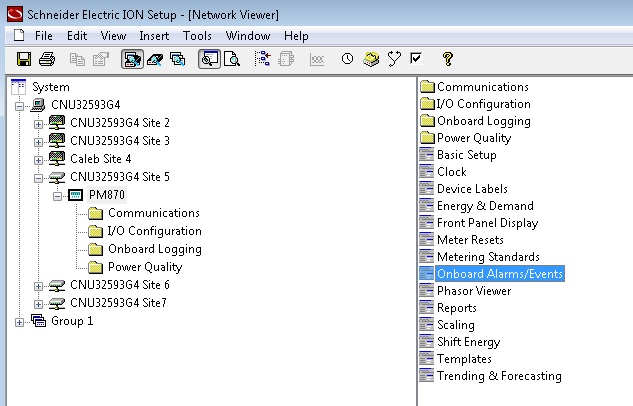

Need to configure the waveform capture on a PM800 series meter.
Product Line
PM850, PM870, ION Setup
Environment
Application using a PM800 series meter to capture waveforms
Cause
Need configure waveform capture on a existing PM850 or PM870
Resolution
Both the PM850 and PM870 can capture waveform data. Capture can be enabled in the Onboard Alarms/Event setup, see figures below.
The PM870 can configure aspects of the waveform like the channels selected, samples per cycle, duration, and pre-event cycles. These values are fixed in the PM850. The waveform capture configuration is accessed through the Power Quality folder.
Note
- ION Setup cannot view waveforms from this device.
Released for: Schneider Electric Vietnam
