


You are currently viewing the content available in Vietnam. If you are looking for information for another region, please select the correct country from the top-left dropdown in the page and 'Navigate to Browse FAQs' in the Support menu.
How to setup the ATV61 or ATV71 HMI keypad to monitor two parameters other than frequency reference in hertz on the display screen?
Issue:
How to setup the HMI keypad to monitor parameters other than frequency in hertz on the display screen.
Product Line:
ATV61/71 Drives
Environment:
All serial numbers for ATV61/71 Drives
Cause:
N/A
Resolution:
To setup the HMI keypad to display parameters other than frequency in the displays screen follow these steps:
1. In the main menu go to Menu 6 Monitoring Configuration.
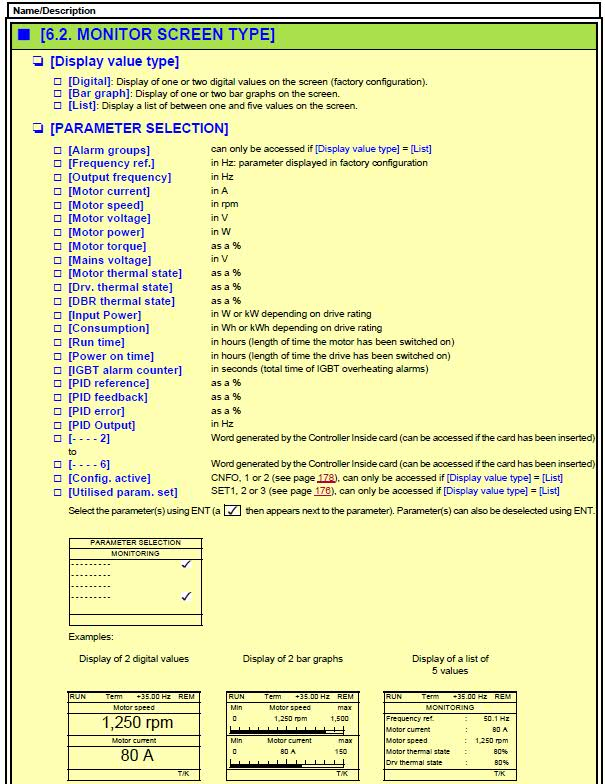
2. In the Monitoring Configuration Menu go to Menu 6.2 Monitor Screen Type: Example Digital.
3. Then go to Parameter Selection.
4. You can now choose up to 2 parameters.
Note: These parameters will be shown on the screen before the Main Menu.
Only 2 parameters can be choosing at a time.
How to setup the HMI keypad to monitor parameters other than frequency in hertz on the display screen.
Product Line:
ATV61/71 Drives
Environment:
All serial numbers for ATV61/71 Drives
Cause:
N/A
Resolution:
To setup the HMI keypad to display parameters other than frequency in the displays screen follow these steps:
1. In the main menu go to Menu 6 Monitoring Configuration.
2. In the Monitoring Configuration Menu go to Menu 6.2 Monitor Screen Type: Example Digital.
3. Then go to Parameter Selection.
4. You can now choose up to 2 parameters.
Note: These parameters will be shown on the screen before the Main Menu.
Only 2 parameters can be choosing at a time.
Released for: Schneider Electric Vietnam
