


Jak vám dnes můžeme pomoci?
Uniflair Manual Start Up and Shut Down (PCO1)
Issue:
Uniflair Manual Start Up and Shut Down (PCO1)
Product line:
TDCVXXXX, TUCVXXXX
Environment:
All Serial Numbers
Cause:
Install/Repair
Resolution:
Start Up the Unit
1. Unlock the main switch.
2. Open the door and remove the closer panel if necessary.
3. Remove the metal screen from the electrical panel using a screwdriver.
4. Position all of the circuit breakers on the electrical board to “I” (on).

5. Install the cover metal sheet to the electrical panel and secure with the screws.
6. Verify all traps are pre-charged with water and all system pipes have been bled of air.
7. For internal pipe, it is necessary to remove the frontal security metal sheet.
8. Close the door and the front panels.
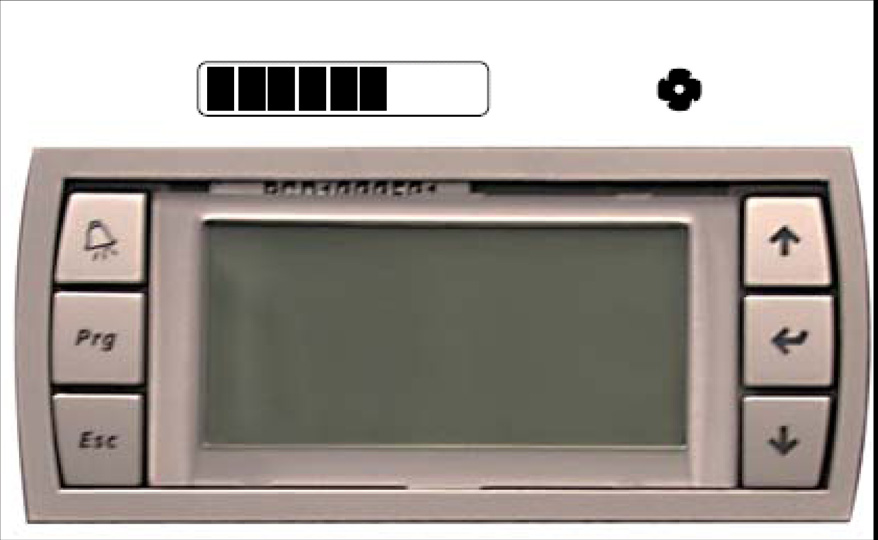
9. On the user interface, press the ENTER button. A sliding bar and a ventilator icon will appear on the display. If an alarm is indicated, consult the Uniflair Chilled Water and Direct Expansion Operation and Maintenance manual.
Turn Off the Unit
1. On the first user interface screen, press the UP or DOWN buttons until the SWITCH OFF UNIT screen appears.
2. Press the ENTER button. The following icons will appear.
3. Press the ENTER button.

For additional information, see the Uniflair Chilled Water and Direct Expansion Operation and Maintenance manual.
Uniflair Manual Start Up and Shut Down (PCO1)
Product line:
TDCVXXXX, TUCVXXXX
Environment:
All Serial Numbers
Cause:
Install/Repair
Resolution:
Start Up the Unit
1. Unlock the main switch.
2. Open the door and remove the closer panel if necessary.
3. Remove the metal screen from the electrical panel using a screwdriver.
4. Position all of the circuit breakers on the electrical board to “I” (on).
5. Install the cover metal sheet to the electrical panel and secure with the screws.
6. Verify all traps are pre-charged with water and all system pipes have been bled of air.
7. For internal pipe, it is necessary to remove the frontal security metal sheet.
8. Close the door and the front panels.
9. On the user interface, press the ENTER button. A sliding bar and a ventilator icon will appear on the display. If an alarm is indicated, consult the Uniflair Chilled Water and Direct Expansion Operation and Maintenance manual.
Turn Off the Unit
1. On the first user interface screen, press the UP or DOWN buttons until the SWITCH OFF UNIT screen appears.
2. Press the ENTER button. The following icons will appear.
3. Press the ENTER button.
For additional information, see the Uniflair Chilled Water and Direct Expansion Operation and Maintenance manual.
Publikováno pro: Schneider Electric Česká republika
Zjistěte více
Řada:
Zjistěte více
Řada:
Potřebujete pomoc?
Nástroj pro výběr produktů
Rychle a snadno vyhledávejte správné produkty a příslušenství pro vaše aplikace.
Získejte nabídku
Poptejte se nás online a náš lokální specialista se s vámi spojí!
Kde nakoupit?
Jednoduše najděte nejbližšího distributora výrobků Schneider Electric ve vašem okolí.
Centrum nápovědy
Zdroje podpory pro všechny své potřeby najdete na jednom místě.