


Jak vám dnes můžeme pomoci?
In SoMachine or EcoStruxure Machine Expert, how do I change the PLC or Magelis/Harmony HMI type?
Issue
In SoMachine or EcoStruxure Machine Expert, how do I change the PLC or Magelis/Harmony HMI type?
Product Line
SoMachine / EcoStruxure Machine Expert
M238, M258, M241, M251, M262, HMISCU/STU, XBTGC, XBTGT/GK, HMIGTO/GTU
Environment
PLC Configuration Software in Windows
Resolution
From the Devices Tree,
Right-click on the controller or HMI and select "convert device" then select the controller you want to change it to.
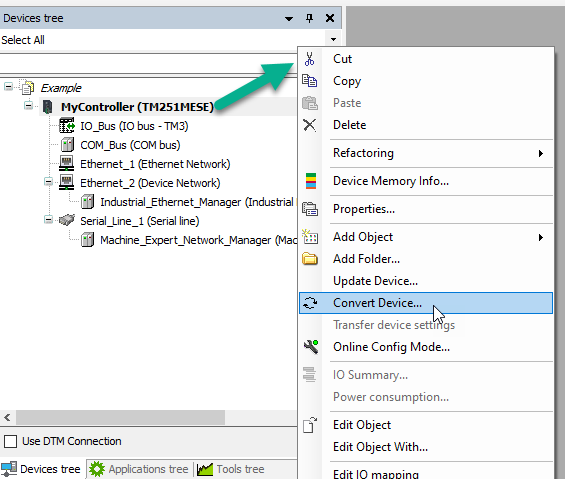
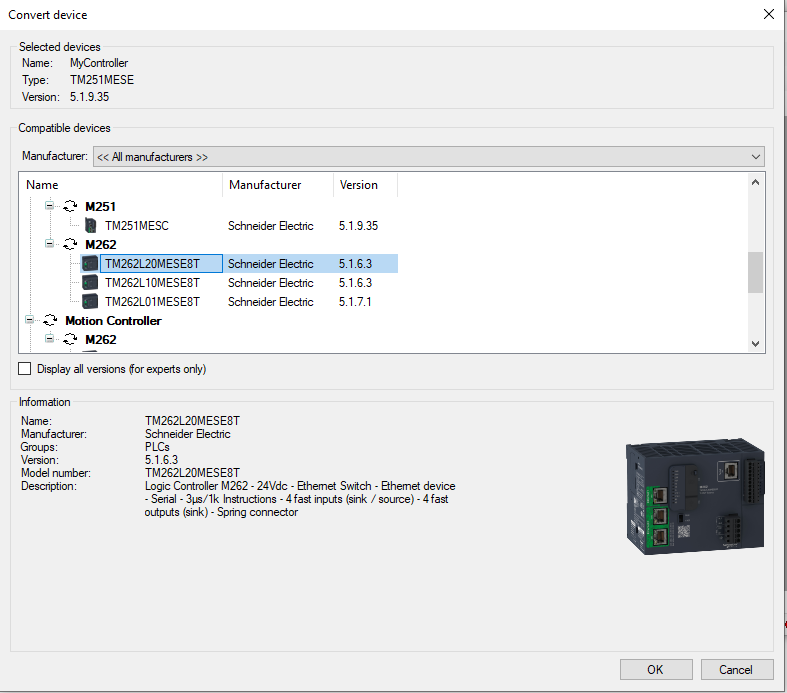
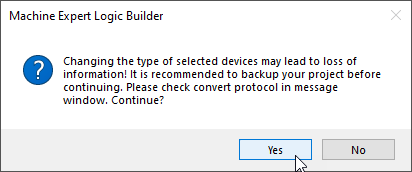
As a result, you will see the Device type has changed:
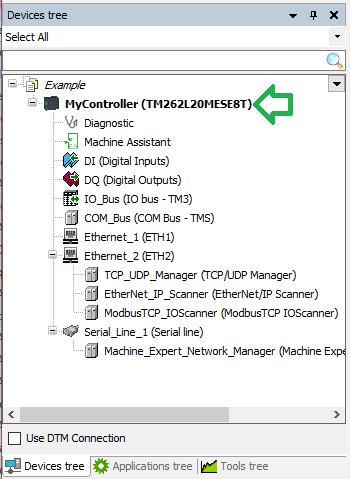
In SoMachine or EcoStruxure Machine Expert, how do I change the PLC or Magelis/Harmony HMI type?
Product Line
SoMachine / EcoStruxure Machine Expert
M238, M258, M241, M251, M262, HMISCU/STU, XBTGC, XBTGT/GK, HMIGTO/GTU
Environment
PLC Configuration Software in Windows
Resolution
From the Devices Tree,
Right-click on the controller or HMI and select "convert device" then select the controller you want to change it to.
As a result, you will see the Device type has changed:
Publikováno pro: Schneider Electric Česká republika
Zjistěte více
Řada:
Zjistěte více
Řada:
Potřebujete pomoc?
Nástroj pro výběr produktů
Rychle a snadno vyhledávejte správné produkty a příslušenství pro vaše aplikace.
Získejte nabídku
Poptejte se nás online a náš lokální specialista se s vámi spojí!
Kde nakoupit?
Jednoduše najděte nejbližšího distributora výrobků Schneider Electric ve vašem okolí.
Centrum nápovědy
Zdroje podpory pro všechny své potřeby najdete na jednom místě.