


Installing 'Unity Dif' returns a license error with License Manager 1.9
Issue
Installing 'Unity Dif 8 SP3' returns a license error indicating that License Manager version 1.5 is requried.
Product Line
Unity Dif 8 SP3
Environment
Windows 10
Resolution
If you try to install 'Unity Dif 8 SP3' on a PC that already has License Manager version 1.9 installed, the following error could get returned.
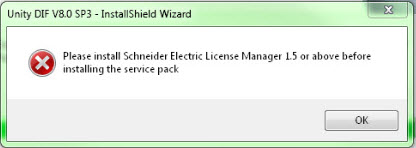
This will occur if there is more than one license version listed in the registry after updating the License Manager.
To resolve the issue: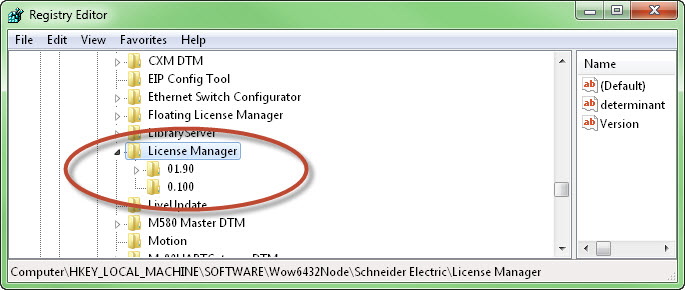
Installing 'Unity Dif 8 SP3' returns a license error indicating that License Manager version 1.5 is requried.
Product Line
Unity Dif 8 SP3
Environment
Windows 10
Resolution
If you try to install 'Unity Dif 8 SP3' on a PC that already has License Manager version 1.9 installed, the following error could get returned.
This will occur if there is more than one license version listed in the registry after updating the License Manager.
To resolve the issue:
- Open the Registry Editor.
- Navigate to the section named 'HKEY_LOCAL_MACHINE\SOFTWARE\Wow6432Node\Schneider Electric\License Manager'.
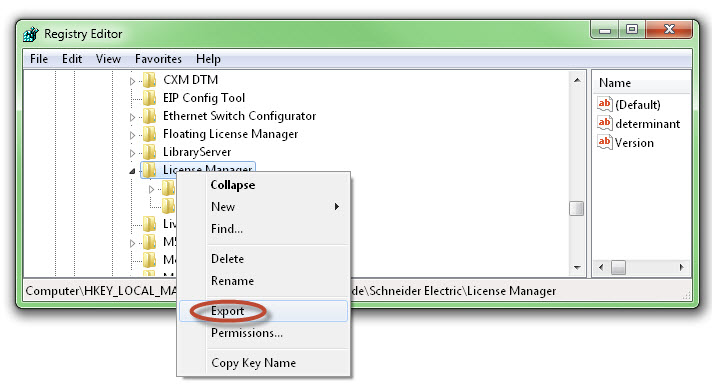
- Backup the 'License Manager' registry key (Right click on the registry key named 'License Manager' and select export)
- -Delete the key for any older version of the License Manager.
- Close the Registry Editor.
- -Retest.
Publikováno pro: Schneider Electric Česká republika
