


Jak vám dnes můžeme pomoci?
How to solve the Unity Pro V11.1 installation problem when the "Unity Pro Ethernet Configuration Tool" CDROM source request occurs.
Trying to install Unity 11.1, if the "Ethernet Configuration Tool" CDROM tool is requested:
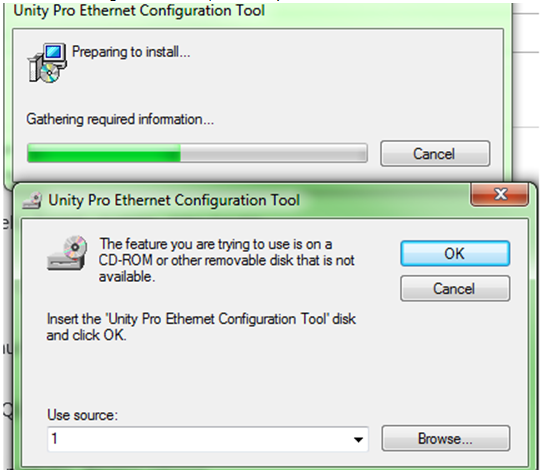
That means the installation process does find the original installation ressource about Unity pro ethernet configuration tool.
Two ways are possible to solve this problem:
- Try to manually uninstall (via the control panel, add/remove program) the "Unity Pro Ethernet configuration tool" and "Unity Pro PlantStructure DTM Library".
If the problem is the same,
- Use the free tool msicuu2.exe (attached) to force the "Unity Pro Ethernet configuration tool" and "Unity Pro PlantStructure DTM Library" uninstallation:
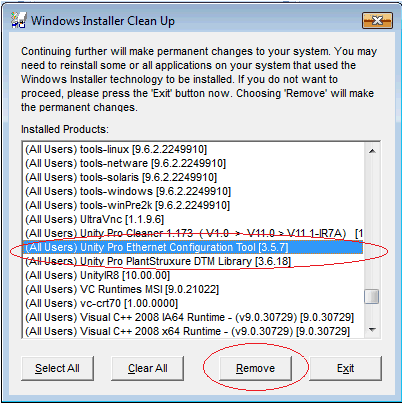
That means the installation process does find the original installation ressource about Unity pro ethernet configuration tool.
Two ways are possible to solve this problem:
- Try to manually uninstall (via the control panel, add/remove program) the "Unity Pro Ethernet configuration tool" and "Unity Pro PlantStructure DTM Library".
If the problem is the same,
- Use the free tool msicuu2.exe (attached) to force the "Unity Pro Ethernet configuration tool" and "Unity Pro PlantStructure DTM Library" uninstallation:
Publikováno pro: Schneider Electric Česká republika
Přílohy
Zjistěte více
Řada:
Zjistěte více
Řada:
Potřebujete pomoc?
Nástroj pro výběr produktů
Rychle a snadno vyhledávejte správné produkty a příslušenství pro vaše aplikace.
Získejte nabídku
Poptejte se nás online a náš lokální specialista se s vámi spojí!
Kde nakoupit?
Jednoduše najděte nejbližšího distributora výrobků Schneider Electric ve vašem okolí.
Centrum nápovědy
Zdroje podpory pro všechny své potřeby najdete na jednom místě.