


Jak vám dnes můžeme pomoci?
How to assign a fixed IP address to SmartConnect enabled Smart-UPS
Issue:
Would like it configure SmartConnect enabled Smart-UPS with a fixed IP address AKA static IP address.
Product Line:
SMTL, SCL, SMT, SMC, SMX, SRTL model Smart-UPS with embedded SmartConnect network port.
Environment:
Smart-UPS with embedded SmartConnect network port

Cause:
Informational
Solution:
For SMT with firmware 4.1 or greater and SMTL, SMX, or SRT model Smart-UPS
From the LCD panel scroll to Configuration and using the down arrow scroll to Menu Type. Set the menu type to Advanced. Then using the down arrow scroll to UPS IP Address Settings and press enter. From the UPS IP Address Setting menu you can change from DHCP to Manual and enter a static IP address, subnet mask, gateway, and DNS.

For SMT model with firmware less than 4.1 and all SCL, SMC models
To set a fix IP address for the embedded SmartConnect network port you must allocate an IP address to the UPS mac address or reserve an IP for the mac address via your router/DHCP server. See the router user's guide or contact your network administrator for assistance.
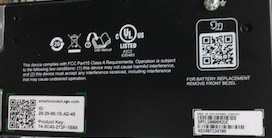
The mac address is the product UPS ID number. It will be found on the QR code sticker of the UPS.

Would like it configure SmartConnect enabled Smart-UPS with a fixed IP address AKA static IP address.
Product Line:
SMTL, SCL, SMT, SMC, SMX, SRTL model Smart-UPS with embedded SmartConnect network port.
Environment:
Smart-UPS with embedded SmartConnect network port
Cause:
Informational
Solution:
For SMT with firmware 4.1 or greater and SMTL, SMX, or SRT model Smart-UPS
From the LCD panel scroll to Configuration and using the down arrow scroll to Menu Type. Set the menu type to Advanced. Then using the down arrow scroll to UPS IP Address Settings and press enter. From the UPS IP Address Setting menu you can change from DHCP to Manual and enter a static IP address, subnet mask, gateway, and DNS.
For SMT model with firmware less than 4.1 and all SCL, SMC models
To set a fix IP address for the embedded SmartConnect network port you must allocate an IP address to the UPS mac address or reserve an IP for the mac address via your router/DHCP server. See the router user's guide or contact your network administrator for assistance.
The mac address is the product UPS ID number. It will be found on the QR code sticker of the UPS.
Publikováno pro: Schneider Electric Česká republika
Zjistěte více
Řada:
Zjistěte více
Řada:
Potřebujete pomoc?
Nástroj pro výběr produktů
Rychle a snadno vyhledávejte správné produkty a příslušenství pro vaše aplikace.
Získejte nabídku
Poptejte se nás online a náš lokální specialista se s vámi spojí!
Kde nakoupit?
Jednoduše najděte nejbližšího distributora výrobků Schneider Electric ve vašem okolí.
Centrum nápovědy
Zdroje podpory pro všechny své potřeby najdete na jednom místě.