


How to delete invalid license in PME
Issue
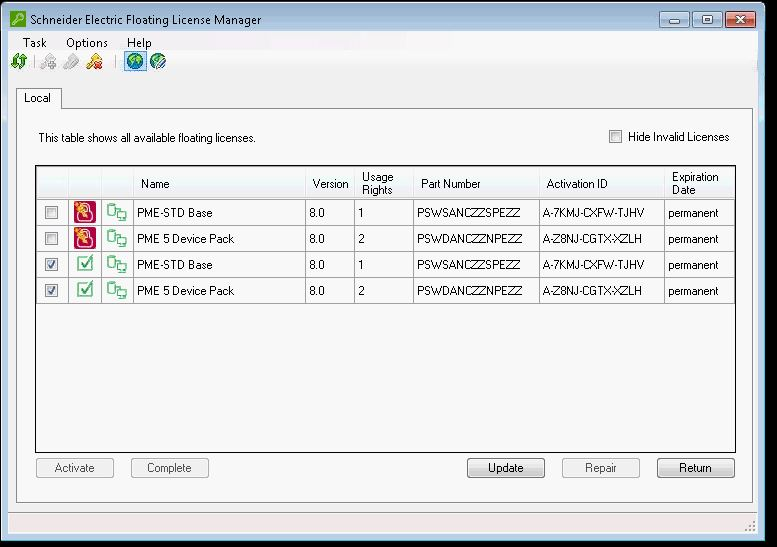
When there are invalid licenses in Floating License Manager, the PME system may refer to those invalid licenses and cause no valid license issues. For example, the following invalid license will stop PME from seeing the valid license.
Product Line
Power Monitoring Expert 7.2
Power Monitoring Expert 8.x
Power Monitoring Expert 9.x
Power Monitoring Expert 2020
Environments
Floating License Manager
Cause
Moving PME to a different server without following the correct procedure can lead to invalid licensing issues. The correct procedure for moving PME to a different server is to return the license first and then reactivate the license once the new server is set up. In most of the cases, the invalid licenses will not cause issues. However, in some situations, the PME system will see both invalid licenses and valid licenses. PME will count both licenses (when you see the license in the Management Console, you'll see every licensed modules and device license will be doubled), and treat all of them as invalid.
Resolutions
The solution is to delete the license storage and refresh the Floating License Manager. The following procedures describe how to do this. It is recommended to attempt Procedure #1 before attempting Procedure #2.
Procedure #1:
Procedure #2:
When there are invalid licenses in Floating License Manager, the PME system may refer to those invalid licenses and cause no valid license issues. For example, the following invalid license will stop PME from seeing the valid license.
Product Line
Power Monitoring Expert 7.2
Power Monitoring Expert 8.x
Power Monitoring Expert 9.x
Power Monitoring Expert 2020
Environments
Floating License Manager
Cause
Moving PME to a different server without following the correct procedure can lead to invalid licensing issues. The correct procedure for moving PME to a different server is to return the license first and then reactivate the license once the new server is set up. In most of the cases, the invalid licenses will not cause issues. However, in some situations, the PME system will see both invalid licenses and valid licenses. PME will count both licenses (when you see the license in the Management Console, you'll see every licensed modules and device license will be doubled), and treat all of them as invalid.
Resolutions
The solution is to delete the license storage and refresh the Floating License Manager. The following procedures describe how to do this. It is recommended to attempt Procedure #1 before attempting Procedure #2.
Procedure #1:
- Return all of the trusted (green icon) PME licenses from the Floating License Manager
- Close the Floating License Manager and stop the lmadminscheider service
- Navigate to C:\ProgramData\FLEXnet (usually this folder is hidden)
- Delete two files that start with "schneide_8098df00_tsf" Leave all other files alone
- Start the lmadminschneider service
- Activate the licenses again in the Floating License Manager
Procedure #2:
- Return all of the trusted (green icon) PME licenses from the Floating License Manager
- Close the Floating License Manager (close License Manager also if it's open) and stop the lmadminscheider service and FlexNet service
- Uninstall Float License Manager from "Control Panel\Programs and Features"
- Stop ION Site service
- Navigate to C:\ProgramData and delete folder FLEXnet (usually this folder is hidden)
- Reinstall Floating License Manager
- Activate the licenses again in the Floating License Manager