


Jak vám dnes můžeme pomoci?
How to reset communication on a Serial modbus device when using the Modbus_IOScanner on a Serial_Line in a Modicon M238, M241, M251, M262?
Issue:
How to reset communication on a Serial modbus device when using the Modbus_IOScanner on a Serial_Line in a Modicon M238, M241, M251, M262 PLC?
Product Line:
Modicon M238, M241, M251, M262
Environment:
SoMachine V4.3, EcoStruxure Machine
Resolution:
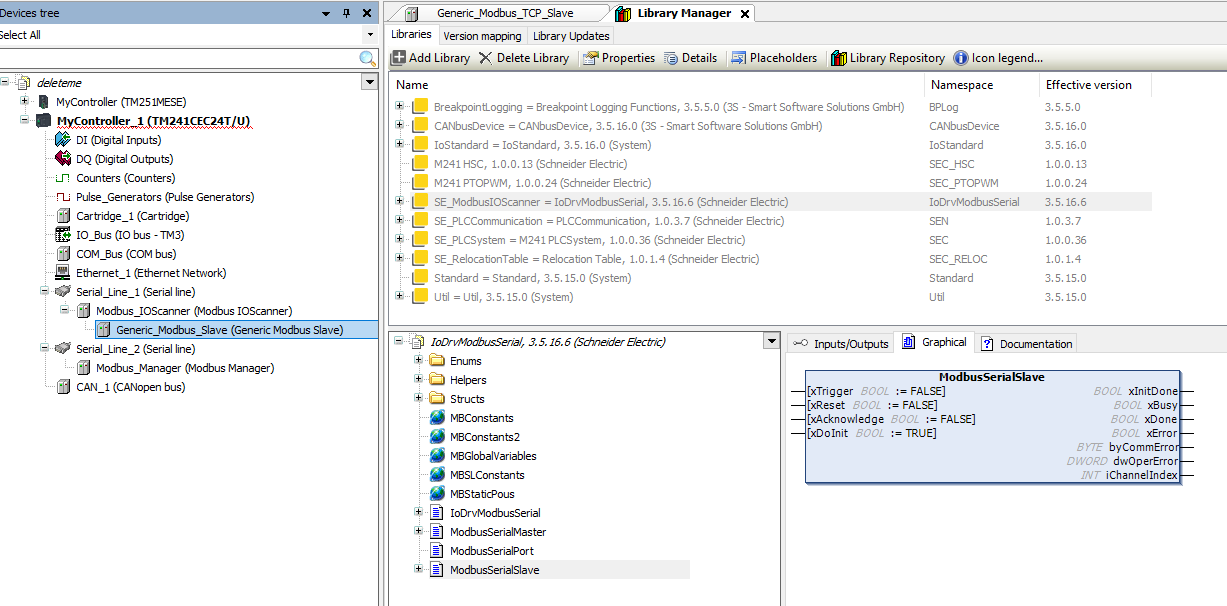
One can use the ModbusSerialSlave Function block available under the SE_ModbusIOScanner library.
A rising edge to the xReset (BOOL) Input Pin will reset initiate a communication reset.
Depicted below is a representation of the Function Block in EcoStruxure Machine Expert v2.0.2.1:
How to reset communication on a Serial modbus device when using the Modbus_IOScanner on a Serial_Line in a Modicon M238, M241, M251, M262 PLC?
Product Line:
Modicon M238, M241, M251, M262
Environment:
SoMachine V4.3, EcoStruxure Machine
Resolution:
One can use the ModbusSerialSlave Function block available under the SE_ModbusIOScanner library.
A rising edge to the xReset (BOOL) Input Pin will reset initiate a communication reset.
Depicted below is a representation of the Function Block in EcoStruxure Machine Expert v2.0.2.1:
Publikováno pro: Schneider Electric Česká republika
Přílohy
Zjistěte více
Řada:
Zjistěte více
Řada:
Potřebujete pomoc?
Nástroj pro výběr produktů
Rychle a snadno vyhledávejte správné produkty a příslušenství pro vaše aplikace.
Získejte nabídku
Poptejte se nás online a náš lokální specialista se s vámi spojí!
Kde nakoupit?
Jednoduše najděte nejbližšího distributora výrobků Schneider Electric ve vašem okolí.
Centrum nápovědy
Zdroje podpory pro všechny své potřeby najdete na jednom místě.