


Why does the M580 Real Time Clock (RTC) fail switching from summer time to winter time when I test the Daylight Saving Time (DST) feature ?
Question :
Why does the M580 Real Time Clock (RTC) fails switching from Summer time to Winter time when I test the Daylight Saving Time (DST) feature ?
Answer :
- The local time DST feature works actually correctly !
- The user is given the wrong impression in the 'PLC Screen\Real Time Clock' window by the local time to UTC conversion feature.
- To test rapidly the DST feature, the user must go through the following steps :
1) determine the 2 UTC dates and times few seconds before the local clock must disrupt between EST (standard time) and EDT (daylight saving time)
e.g. Boston MA USA 2021
Sun, 14 Mar, 02:00 EST → EDT +1 hour (DST start) UTC-5h -> UTC-4h => 1:59:55 + 5h = 6:59:55
Sun, 7 Nov, 02:00 EDT → EST -1 hour (DST end) UTC-4h -> UTC-5h => 1:59:55 + 4h = 5:59:55
2) open an animation table showing %S50, and %SW50 to %SW53, side by side with the RTC window and follow these steps
Spring DST disruption standard time -> daylight saving time (+1 hour)
set %S50 to 1 to stop the %SW50-53 update and enable modification
set %SW50 to 16#5500 (seconds)
set %SW51 to 16#0659 (hours-minutes)
set %SW52 to 16#0314 (month-day)
set %SW53 to 16#2021 (year)
set %S50 to 0 to set the RTC and enable the %SW50-53 update from RTC
look in the animation window, the local time will jump from 01:59:59 to 03:00:00
Autumn DST disruption daylight saving time -> standard time (-1 hour)
set %S50 to 1
set %SW50 to 16#5500 (seconds)
set %SW51 to 16#0559 (hours-minutes)
set %SW52 to 16#1107 (month-day)
set %SW53 to 16#2021 (year)
set %S50 to 0
look in the animation window, the local time will jump from 01:59:59 to 01:00:00
figure 1 : Automn local time disruption testing
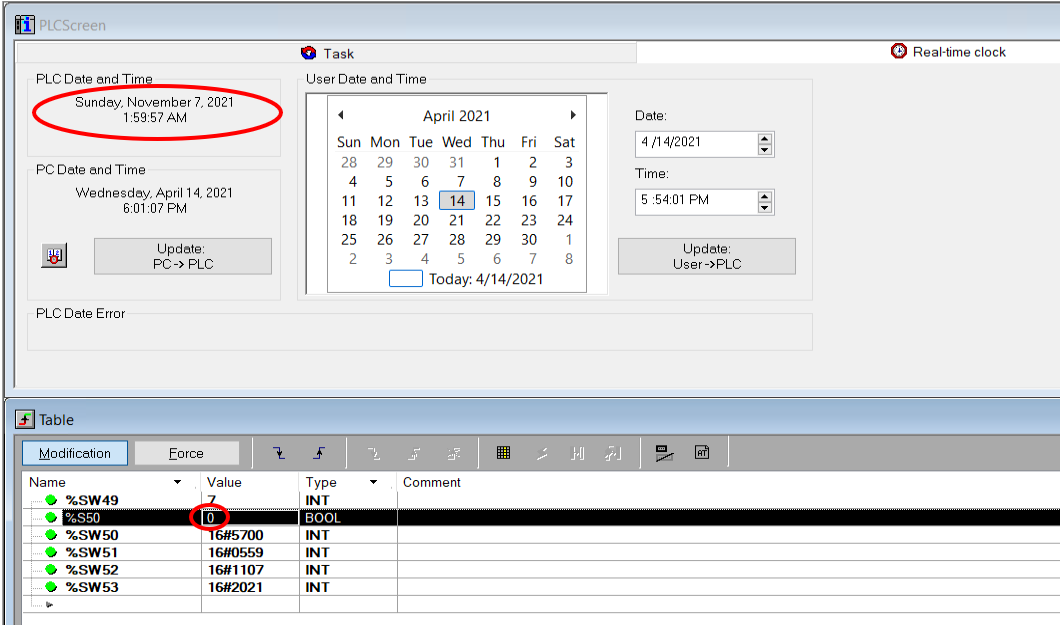
here, after %S50 has been reset, the automn local time disruption is just about to occur (in 3 seconds)
3) Basics :
- the M580 RTC is running UTC time (Coordinated Universal Time) so that no time disruption ever occur internally.
- the displayed local time is calculated from the RTC UTC time
- the automn Daylight Saving Time (DTS) ends at 02:00AM.
- when setting the local time before 02:00:00 (say 01:59:55) using the control expert real time clock window, this time has to be converted to UTC before setting the RTC.
- the conversion only computes EST (standard time) to UTC.
- the only way to witness the disruption using the animation screen is to set the local time to 00:59:59 (forcing DST) and to wait for an hour to see the automn local time disruption.
Why does the M580 Real Time Clock (RTC) fails switching from Summer time to Winter time when I test the Daylight Saving Time (DST) feature ?
Answer :
- The local time DST feature works actually correctly !
- The user is given the wrong impression in the 'PLC Screen\Real Time Clock' window by the local time to UTC conversion feature.
- To test rapidly the DST feature, the user must go through the following steps :
1) determine the 2 UTC dates and times few seconds before the local clock must disrupt between EST (standard time) and EDT (daylight saving time)
e.g. Boston MA USA 2021
Sun, 14 Mar, 02:00 EST → EDT +1 hour (DST start) UTC-5h -> UTC-4h => 1:59:55 + 5h = 6:59:55
Sun, 7 Nov, 02:00 EDT → EST -1 hour (DST end) UTC-4h -> UTC-5h => 1:59:55 + 4h = 5:59:55
2) open an animation table showing %S50, and %SW50 to %SW53, side by side with the RTC window and follow these steps
Spring DST disruption standard time -> daylight saving time (+1 hour)
set %S50 to 1 to stop the %SW50-53 update and enable modification
set %SW50 to 16#5500 (seconds)
set %SW51 to 16#0659 (hours-minutes)
set %SW52 to 16#0314 (month-day)
set %SW53 to 16#2021 (year)
set %S50 to 0 to set the RTC and enable the %SW50-53 update from RTC
look in the animation window, the local time will jump from 01:59:59 to 03:00:00
Autumn DST disruption daylight saving time -> standard time (-1 hour)
set %S50 to 1
set %SW50 to 16#5500 (seconds)
set %SW51 to 16#0559 (hours-minutes)
set %SW52 to 16#1107 (month-day)
set %SW53 to 16#2021 (year)
set %S50 to 0
look in the animation window, the local time will jump from 01:59:59 to 01:00:00
figure 1 : Automn local time disruption testing
here, after %S50 has been reset, the automn local time disruption is just about to occur (in 3 seconds)
3) Basics :
- the M580 RTC is running UTC time (Coordinated Universal Time) so that no time disruption ever occur internally.
- the displayed local time is calculated from the RTC UTC time
- the automn Daylight Saving Time (DTS) ends at 02:00AM.
- when setting the local time before 02:00:00 (say 01:59:55) using the control expert real time clock window, this time has to be converted to UTC before setting the RTC.
- the conversion only computes EST (standard time) to UTC.
- the only way to witness the disruption using the animation screen is to set the local time to 00:59:59 (forcing DST) and to wait for an hour to see the automn local time disruption.