


Jak vám dnes můžeme pomoci?
Hybrid DCS [2019] - How to display the Chinese Characters in description properly when importing and exporting the application as CSV type?
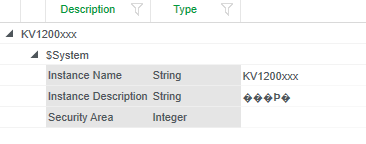
Customer encountered an error in current project that the Chinese characters are not displayed properly in Excel when importing or exporting application from HDCS as CSV type.

- Product Line
- Environment
- After exporting from Application Explorer, navigate to the saved csv file on your local system.
- Open CSV file with Notepad.
- Save the file by either Ctrl+S from your keyboard or File->Save. This saves the file with same name.
- Open CSV file in Excel, then Chinese characters are displayed properly in Excel.
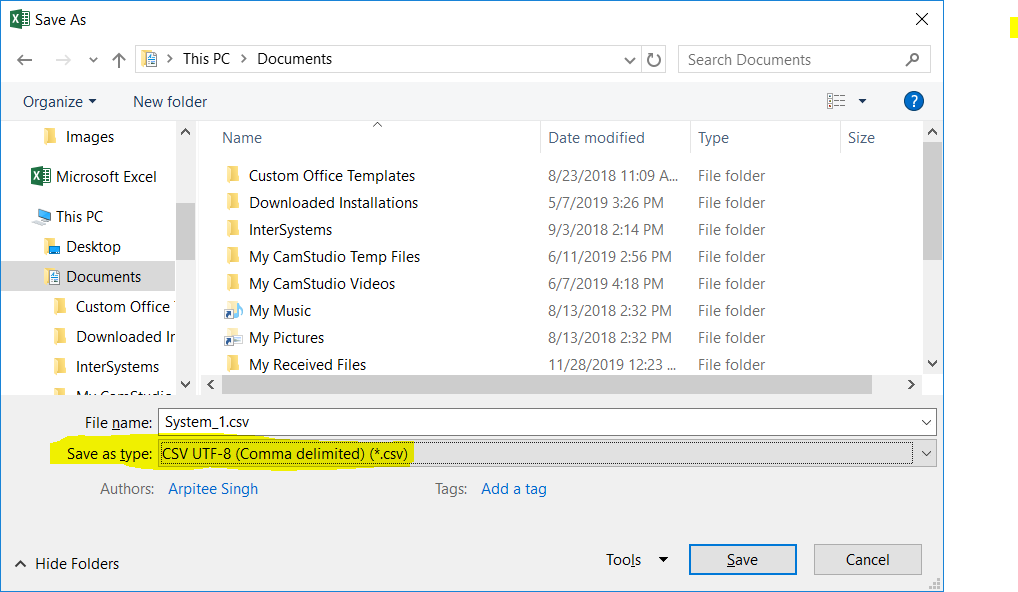
- After modifying the description with Chinese characters, save the Excel as "CSV UTF -8 (Comma delimited) (*.csv)" type.
- Then importing it into HDCS, the issue will be resolved, and user can see Chinese characters in description.
Publikováno pro: Schneider Electric Česká republika
Zjistěte více
Řada:
Zjistěte více
Řada:
Potřebujete pomoc?
Nástroj pro výběr produktů
Rychle a snadno vyhledávejte správné produkty a příslušenství pro vaše aplikace.
Získejte nabídku
Poptejte se nás online a náš lokální specialista se s vámi spojí!
Kde nakoupit?
Jednoduše najděte nejbližšího distributora výrobků Schneider Electric ve vašem okolí.
Centrum nápovědy
Zdroje podpory pro všechny své potřeby najdete na jednom místě.