


Two Step Authentication
Issue: To verify two way authentication for Application.
Cause: Two way authentication is provided on top of user login in the application to make it more secure.
Resolution:
To make Authentication more secure, Two Step Authentication feature has integrated inside the application. Please follow the below steps to proceed.
Cause: Two way authentication is provided on top of user login in the application to make it more secure.
Resolution:
To make Authentication more secure, Two Step Authentication feature has integrated inside the application. Please follow the below steps to proceed.
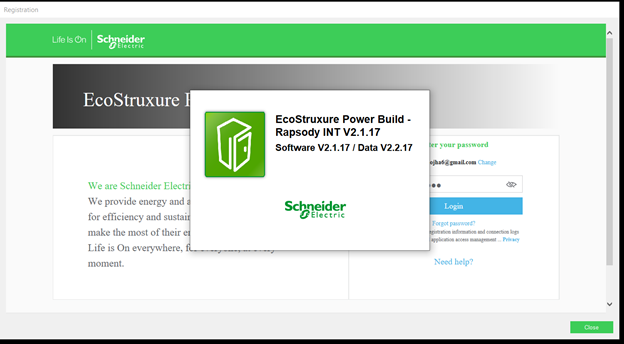
- On Login page fill the userID (registered mail ID) and Click on NEXT button.
2. Fill the Password and click on Login Button.
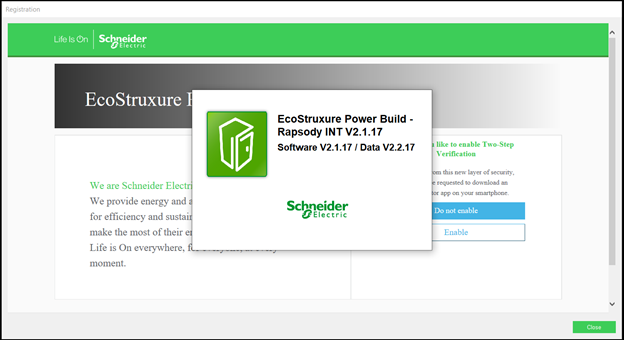
3.You can see two options "enabling or disabling" the Two Step Verification. Click on 'Do not Enable' button if don’t want Two Step Verification. To Enable it, Click on Enable button.
Note:- This is one time process, after selecting any of the options you will not get this option again in future for the same login ID.
4. Click on Enable button you will receive a Bar Code which can scan through Authentication application( Authentication application can download in Mobile phone by using PlayStore(Andriod)/AppStore(Apple OS)).
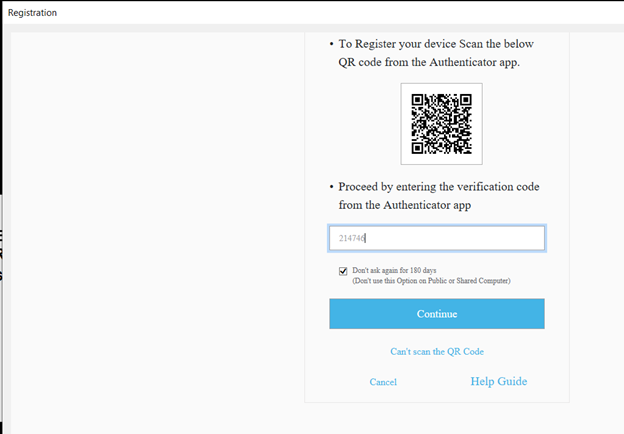
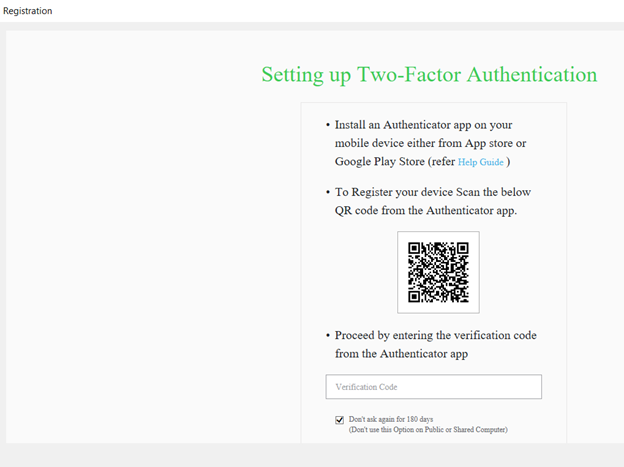 5. Scan the Barcode from Authentication App through Mobile phone and fill the 6 digit code in Verification Code field and click on Continue button.
3.You can see two options "enabling or disabling" the Two Step Verification. Click on 'Do not Enable' button if don’t want Two Step Verification. To Enable it, Click on Enable button.
Note:- This is one time process, after selecting any of the options you will not get this option again in future for the same login ID.
4. Click on Enable button you will receive a Bar Code which can scan through Authentication application( Authentication application can download in Mobile phone by using PlayStore(Andriod)/AppStore(Apple OS)).