


How to update the firmware of the Harmony STM6 Edge Box HMISTM6BOXIOT?
The goal of this FAQ is to explain how to update the firmware of the Harmony Edge Box HMI.
This article is applicable for HMISTM6BOXIOT.
To update the firmware of Harmony STM6 Edge Box HMI, need to follow some step (Last official update: V1.1.0).
Here the steps:
1 - Download the last software corresponding to the last official update: https://schneiderelectric.sharepoint.com/:f:/s/BoxSupportL3Group/EiO8SIa0xSVAgsXxTW6XbpEBgNU7lpMDlq0sEBs56UWWZg?e=RHI6zt
2 - Copy BOOTLD13.SYS and BOOTOS13.SYS to root of USB storage.
3 - Insert the USB flash disk in the USB port of HMISTM6BOXIOT.
4 - Connect to the configuration menu.
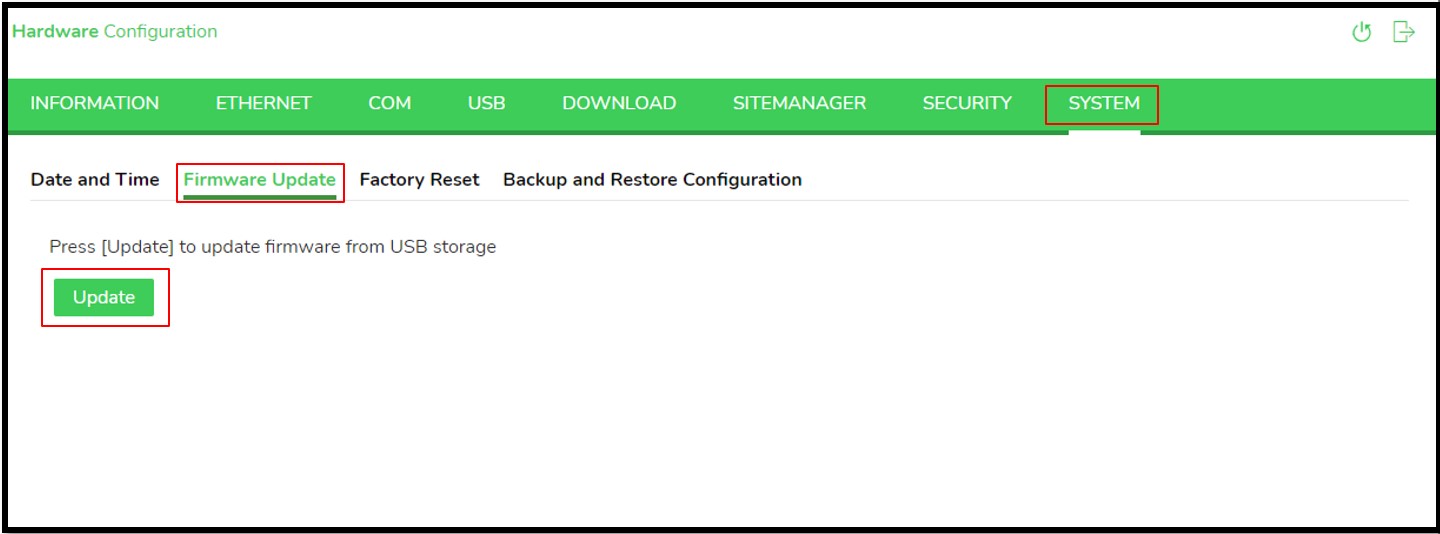
The duration to update the firmware is around 1 - 2 minutes.
After update the target will restart automatically.
This article is applicable for HMISTM6BOXIOT.
To update the firmware of Harmony STM6 Edge Box HMI, need to follow some step (Last official update: V1.1.0).
Here the steps:
1 - Download the last software corresponding to the last official update: https://schneiderelectric.sharepoint.com/:f:/s/BoxSupportL3Group/EiO8SIa0xSVAgsXxTW6XbpEBgNU7lpMDlq0sEBs56UWWZg?e=RHI6zt
2 - Copy BOOTLD13.SYS and BOOTOS13.SYS to root of USB storage.
3 - Insert the USB flash disk in the USB port of HMISTM6BOXIOT.
4 - Connect to the configuration menu.
The duration to update the firmware is around 1 - 2 minutes.
After update the target will restart automatically.
Publikováno pro: Schneider Electric Česká republika

Potřebujete pomoc?
Nástroj pro výběr produktů
Rychle a snadno vyhledávejte správné produkty a příslušenství pro vaše aplikace.
Získejte nabídku
Poptejte se nás online a náš lokální specialista se s vámi spojí!
Kde nakoupit?
Jednoduše najděte nejbližšího distributora výrobků Schneider Electric ve vašem okolí.
Centrum nápovědy
Zdroje podpory pro všechny své potřeby najdete na jednom místě.