


How to get the firmware version of an ethernet communication module (BMENOCxxx) ?
If the firmware has never been updated since it has been manufactured, the SV marked on the product shows the firmware release set inside the module.
Otherwise, there are three methods for getting the firmware release of an ethernet communication module in a Mx80 rack :
1 : By connecting Control-Expert to the CPU :
a : creating an animation table and instantiating the DDDT of the BMENOC
b : the parameter "FIRMWARE_VERSION" is set with the value of the firmware version in hexadecimal (high byte: Major version; Low byte: Minor version) => in the example below, version 2.19 is displayed
b : the parameter "FIRMWARE_VERSION" is set with the value of the firmware version in hexadecimal (high byte: Major version; Low byte: Minor version) => in the example below, version 2.19 is displayed
2 : By using the Unity-Loader tool with the BMENOCxyz device :
a : Connect Unity-Loader with the device by setting its IP address and clicking on the "Connect" button (172.168.12.1 in our example)
b : the firmware release is displayed on the right window as shown below (version 2.19 in our example) :
b : the firmware release is displayed on the right window as shown below (version 2.19 in our example) :
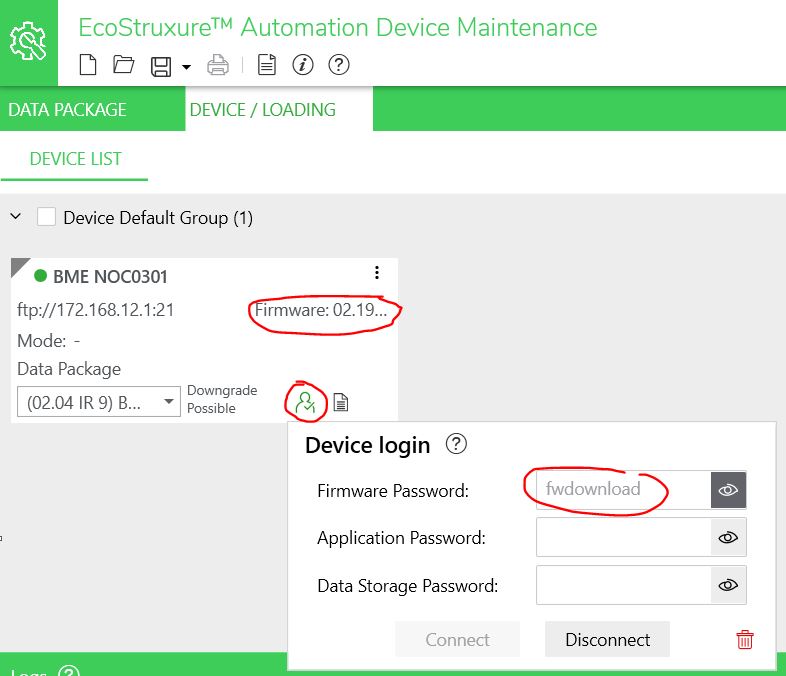
3 : By using the EADM (EcoStruxure Automation Device Maintenance) tool with the device BMENOCxyz :
a : Connect the tool with the device by selecting "FTP" Connection and setting its IP address

b : Select the package (*.ldx file) available in the "Data Package" folder :

c : Click on the icon to enter the Firmware password and click on Connect => the firmware version of the device appears in the box (in this example, 2.19)
b : Select the package (*.ldx file) available in the "Data Package" folder :
c : Click on the icon to enter the Firmware password and click on Connect => the firmware version of the device appears in the box (in this example, 2.19)