


M340: Compatibility between PLC web server and web browsers: Time to access becomes longer.
Since SV3.30 version of M340 CPU's firmware, the access to web pages could be limited depending on the web browser used on user’s machine.
What we see is with Internet Explorer, Chrome and Edge ( with default settings), the time to access to the web pages takes more than one minute and pages can remain blank.
Note that the impacted products also include : BMXNOC.... , BMXNOE...., BMXNOR.... and BMENOC.... (on custom webpages only ).
Root cause has been identified and is due to support for Java applets and Silverlight (NPAPI plugins) been dropped out from most of the web browsers.
From Windows Start menu: Java/Java configure: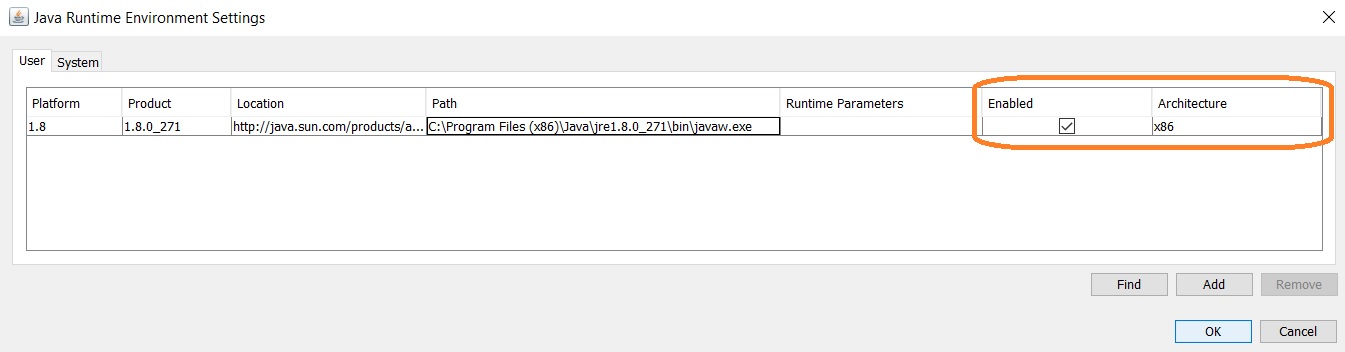
Secondly, it's needed to work on setting the Security levels through the Java configuration of the Java Control Panel:

For all ethernet modules using web pages Java exception site list has to be fill:
Add IP@ of PLC ethernet address for Webserver, to the exception list of web site.
• Add the exception list of Webpage to allow access
• Click Apply and OK to save changes made to the Java Control Panel.
2 Edge Explorer Configuration
What we see is with Internet Explorer, Chrome and Edge ( with default settings), the time to access to the web pages takes more than one minute and pages can remain blank.
Note that the impacted products also include : BMXNOC.... , BMXNOE...., BMXNOR.... and BMENOC.... (on custom webpages only ).
Root cause has been identified and is due to support for Java applets and Silverlight (NPAPI plugins) been dropped out from most of the web browsers.
- Chrome browser has not supported either technology since September 2015 (disabled by default in Chrome v42; disabled permanently in Chrome v45)
- Burp suite uses the open-source version of Chromium.
- Firefox also has not supported either technology since September 2018 (Last version supported: Firefox v52 ESR X86 – no x64 support)
- Java Runtime Environment installation
From Windows Start menu: Java/Java configure:
- In Java Control Panel, Java tab (Visualization button):
- JRE parameter for user and system: select only x86 version
Secondly, it's needed to work on setting the Security levels through the Java configuration of the Java Control Panel:
- In the Java Control Panel, click on the Security tab.
- Select the desired Security level (High is recommended).
- Click Apply.
For all ethernet modules using web pages Java exception site list has to be fill:
Add IP@ of PLC ethernet address for Webserver, to the exception list of web site.
• Add the exception list of Webpage to allow access
• Click Apply and OK to save changes made to the Java Control Panel.
2 Edge Explorer Configuration
First, Internet Explorer compatibility mode is setup in Parameter section (right corner)
Under the “Internet Explorer compatibility” section:

Restart Edge
Note on high loaded application: M340 webserver is using same processor resource as your application, so please check Chapter Processor Performance/Execution of Tasks for MAST and FAST duration sizing.
So for heavily loaded application it is recommended to set MAST in Periodic mode with sufficient spare time to allow webserver processing.
- Click the Settings and More (ellipsis) button on the top-right corner.
- Select the Settings option. Click on Default browser.
Under the “Internet Explorer compatibility” section:
- turn on the “Allow sites to be reloaded in Internet Explorer mode” toggle switch.
- Add IP@ of PLC ethernet address for Webserver
Restart Edge
- Open M340 web page and reload it in Internet Explorer mode
Note on high loaded application: M340 webserver is using same processor resource as your application, so please check Chapter Processor Performance/Execution of Tasks for MAST and FAST duration sizing.
So for heavily loaded application it is recommended to set MAST in Periodic mode with sufficient spare time to allow webserver processing.