


Why the display cannot be duplicated with the Multi Display Adapter and HMIGTU open box Win10?
The option "Duplicate these displays" is not available in Windows setting when using Multi Display Adapter with HMIGTU Open Box Win10
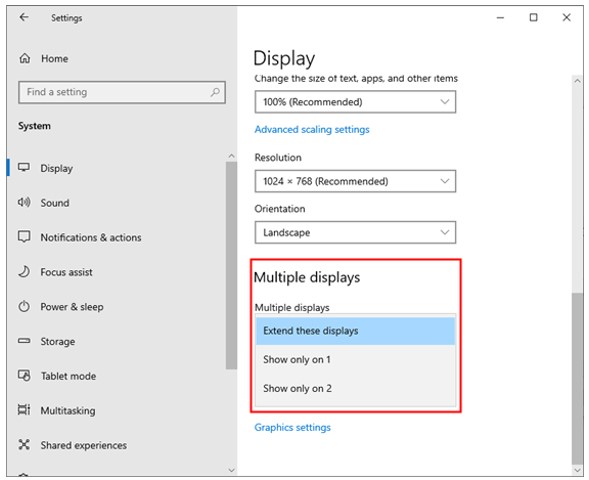
This article is applicable for the HMIGTU open box Win10 and the Multi Display Adaptor
Root cause
“Intel® Graphics Driver doesn’t support Duplicate Setting with graphics driver for remote connection (DisplayLink® Graphics Driver).
DisplayLink® Graphics Driver is a graphics Driver for remote connection.
Before to follow the procedure to fix the issue, please note that:
First Step: Uninstall Intel® Graphics Driver
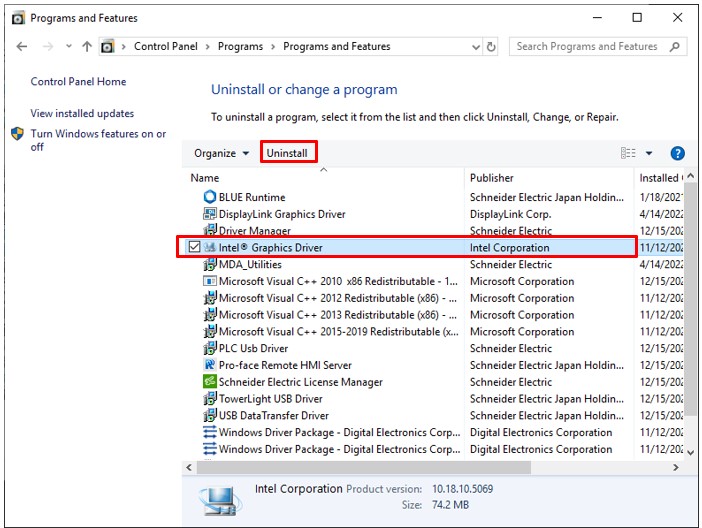
1. Open Control Panel – Uninstall a Program
2. Select “Intel® Graphics Driver” and “Uninstall”
3. Open Device Manager
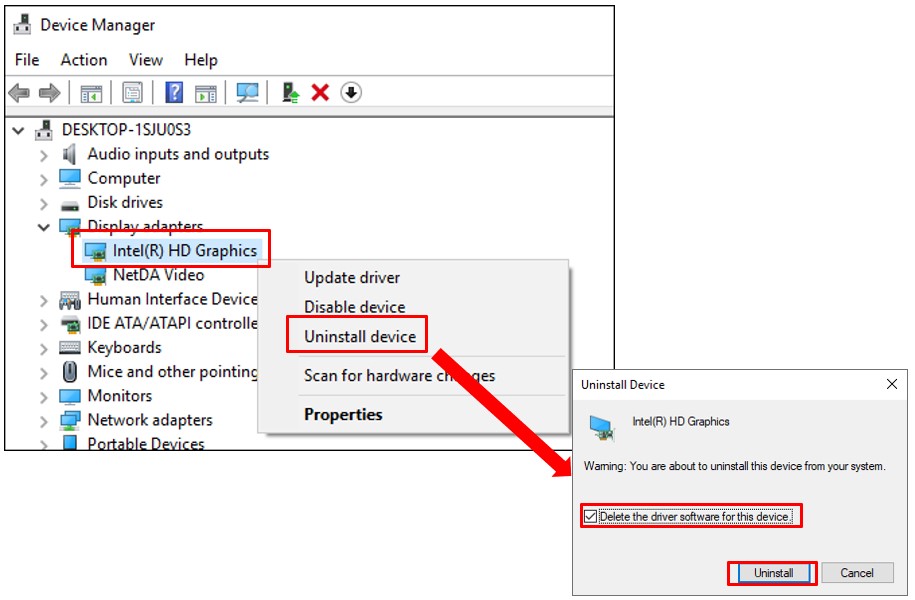
4. Select and Right-Click “Display adapters – Intel® HD Graphics”
5. Select “Uninstall device”
6. Turn on the check box “Delete the driver software for this device” and select Uninstall
Limitation:
1. Graphic function performance is down
-> Graphic performance might get slow. Especially animation, video image could be stop (not re-start).
2. The resolution setting of 4:3 Display Model is limited
-> Some resolution could not select. (The recommended resolution for unit is still supported.)
3. The resolution setting and display image of Wide Display Model is not correct
-> Wide resolution might be able to be selected when duplicated. But display image might not be displayed correctly. Display image is stretched or shrunk.
This article is applicable for the HMIGTU open box Win10 and the Multi Display Adaptor
Root cause
“Intel® Graphics Driver doesn’t support Duplicate Setting with graphics driver for remote connection (DisplayLink® Graphics Driver).
DisplayLink® Graphics Driver is a graphics Driver for remote connection.
Before to follow the procedure to fix the issue, please note that:
- Recommend to use Mouse and Keyboard.
- Disable Write Filter Function
- Product restart is required
- After the uninstall, MDA setting is required again. Please set by the “MDA Configuration Tool”
First Step: Uninstall Intel® Graphics Driver
1. Open Control Panel – Uninstall a Program
2. Select “Intel® Graphics Driver” and “Uninstall”
3. Open Device Manager
4. Select and Right-Click “Display adapters – Intel® HD Graphics”
5. Select “Uninstall device”
6. Turn on the check box “Delete the driver software for this device” and select Uninstall
Limitation:
1. Graphic function performance is down
-> Graphic performance might get slow. Especially animation, video image could be stop (not re-start).
2. The resolution setting of 4:3 Display Model is limited
-> Some resolution could not select. (The recommended resolution for unit is still supported.)
3. The resolution setting and display image of Wide Display Model is not correct
-> Wide resolution might be able to be selected when duplicated. But display image might not be displayed correctly. Display image is stretched or shrunk.
Publikováno pro: Schneider Electric Česká republika
