


How to change the IP static address of a computer under Windows 10 when configuring EV Charging Expert ?
Prerequisite :
To have the « admin » rights on your computer and to use Windows 10 or higher.
If you don’t have the rights on your computer, approach your IT manager.
Several possibilities to access the network parameters:
• In the Windows taskbar, click on the research icon. In the window, write: NCPA.CPL and enter.
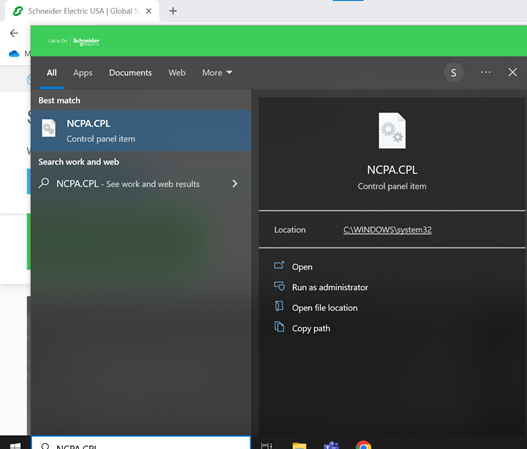
• Go to: Parameters > Network and Internet > Change adapter options.
When you are on the screen « Network connections », follow the instructions:
Enter an IP address that is on the same network as the EVCE.
For example, the IP address of the EVCE is 192.168.0.128, you will need to enter for your computer an IP address following the same format: 192.168.0.XXX (except for 128) and subnet mask: 255.255.255.0

Your computer is now configured in static IP address.
To have the « admin » rights on your computer and to use Windows 10 or higher.
If you don’t have the rights on your computer, approach your IT manager.
Several possibilities to access the network parameters:
• In the Windows taskbar, click on the research icon. In the window, write: NCPA.CPL and enter.
• Go to: Parameters > Network and Internet > Change adapter options.
When you are on the screen « Network connections », follow the instructions:
Enter an IP address that is on the same network as the EVCE.
For example, the IP address of the EVCE is 192.168.0.128, you will need to enter for your computer an IP address following the same format: 192.168.0.XXX (except for 128) and subnet mask: 255.255.255.0
Your computer is now configured in static IP address.
If you have any problem to access or configure your network parameters, reach your IT manager.