


How do you keep the security settings saved on the HMI after a new download?
Issue:
When downloading again to an HMI, how to keep the security settings that were previously downloaded.
Product Line:
Vijeo Designer 6.2
Resolution:
There is a way for you to keep the user's setting saved on your HMI even after downloading again the project into the HMI. You just have to make sure to do 2 things:
1. On your Vijeo Designer project please go to Target -> General and please make sure to check the checkbox "Preserve Run-Time Data".
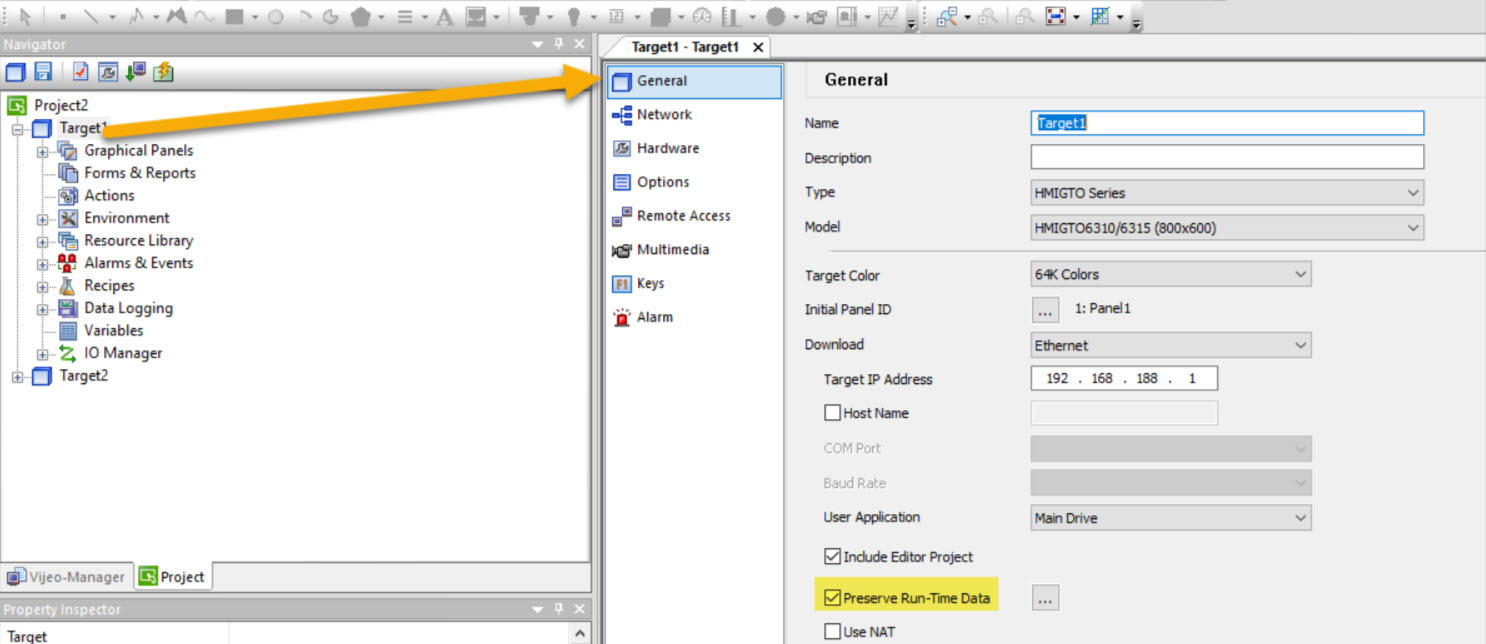
2. Later, when you go to download to the HMI, please make sure to leave UNCHECKED the checkbox "Delete All Runtime". If you do select this option, any time you make a security setting change it will override the existing security settings on the HMI. If you do not check the checkbox, your settings do not take effect.
This "Delete All Runtime" option may appear more than one time, please make sure to always leave it UNCHECKED.
If this FAQ did not solve your issue, you can chat with us at chat with us or e-mail us at customer.services@se.com to create a case with our Technical Support Team.
If you are not located in North America, please contact your local Customer Care Center for assistance:
Support | Schneider Electric Global (se.com)
When downloading again to an HMI, how to keep the security settings that were previously downloaded.
Product Line:
Vijeo Designer 6.2
Resolution:
There is a way for you to keep the user's setting saved on your HMI even after downloading again the project into the HMI. You just have to make sure to do 2 things:
1. On your Vijeo Designer project please go to Target -> General and please make sure to check the checkbox "Preserve Run-Time Data".
2. Later, when you go to download to the HMI, please make sure to leave UNCHECKED the checkbox "Delete All Runtime". If you do select this option, any time you make a security setting change it will override the existing security settings on the HMI. If you do not check the checkbox, your settings do not take effect.
This "Delete All Runtime" option may appear more than one time, please make sure to always leave it UNCHECKED.
If this FAQ did not solve your issue, you can chat with us at chat with us or e-mail us at customer.services@se.com to create a case with our Technical Support Team.
If you are not located in North America, please contact your local Customer Care Center for assistance:
Support | Schneider Electric Global (se.com)