


How to Set Properties and Retrieve Logs from GSE acting as an OPC UA Server
The feature that allows GSE (Geo SCADA Expert) to work as an OPC UA Server is new to the product (in GSE 2022) and uses a different approach when compared to GSE working as an OPC DA Server. When there is a need to troubleshoot GSE as an OPC DA Server, the DB log files are the ones to be analyzed. GSE as an OPC UA Server is different, it relies on AVEVA PCS Service and a particular driver was developed to manage it.
When it is necessary to troubleshoot GSE as an OPC UA Server, logs from the PCSService are the ones to be retrieved and sent to Technical Support.
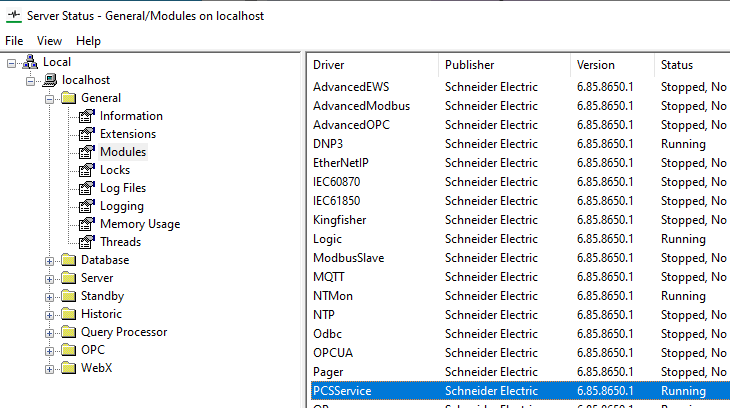
The settings for the PCSService driver can be found by going to the Server Status tool > General > Modules page:
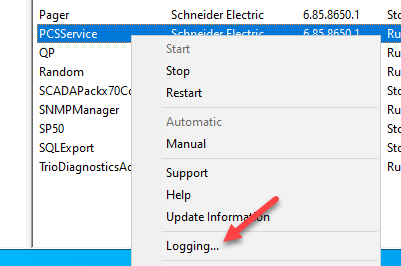
Right-click on "PCSService" and select "Logging...":
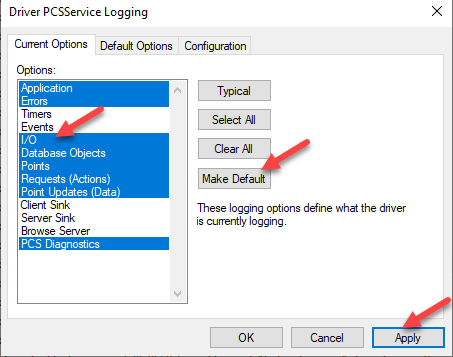
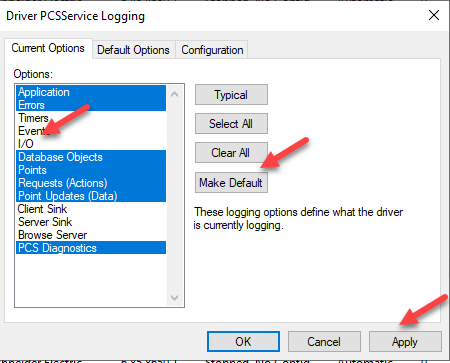
Under "Current Options" tab, select the "I/O" option (background will turn blue), click on the "Make Default" button, click on the "Apply" button:
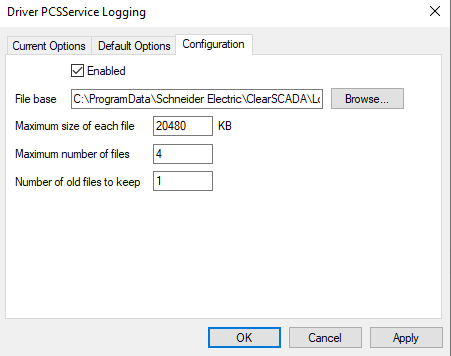
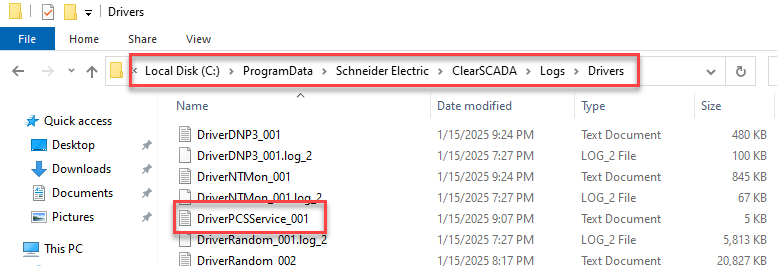
Under "Configuration" tab, the end user can see the location of the log files and adjust the size and number of files to keep:
After performing the tests and retrieving the log files, the end user can disable the I/O flag by going again to the "Current Options" tab, clicking on the "I/O" option (so it will be not selected, in white background), clicking on the "Make Default" option, and then on the "Apply" button:
When it is necessary to troubleshoot GSE as an OPC UA Server, logs from the PCSService are the ones to be retrieved and sent to Technical Support.
The settings for the PCSService driver can be found by going to the Server Status tool > General > Modules page:
Right-click on "PCSService" and select "Logging...":
Under "Current Options" tab, select the "I/O" option (background will turn blue), click on the "Make Default" button, click on the "Apply" button:
Under "Configuration" tab, the end user can see the location of the log files and adjust the size and number of files to keep:
After performing the tests and retrieving the log files, the end user can disable the I/O flag by going again to the "Current Options" tab, clicking on the "I/O" option (so it will be not selected, in white background), clicking on the "Make Default" option, and then on the "Apply" button: