


APDU10000 Series Radius User has no Admin access
APDU10000 Series Radius User has no Admin access
Product Line:
Radius user has administrative access, but after logging in to the PDU, the Radius user don't have admin privileges. The System Management icon is missing.

Solution:
Login to the PDU using a user with administrator privilege. Click on the User Settings icon. Then click Add Role.
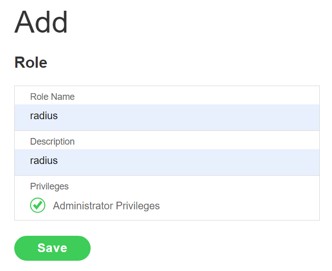
Enter the details as shown below (its important to only use radius for the Role Name and Description) and click on Administrator Privileges, then Save.
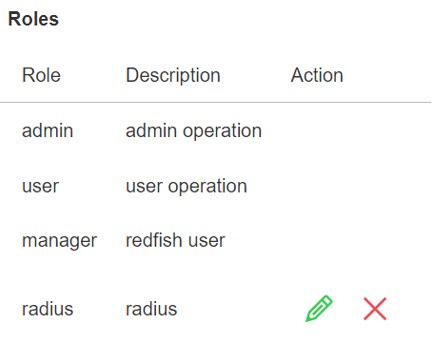
A message will appear that the Role was added successfully. Check the Roles section which is on the same page (User Setting) and the added role should be listed.
Login to the PDU using a Radius account and the System Management icon should now be available.

Product Line:
- ADPU10000 series
- Any Firmware version but tested on 2.0.6.x
Radius user has administrative access, but after logging in to the PDU, the Radius user don't have admin privileges. The System Management icon is missing.
Solution:
Login to the PDU using a user with administrator privilege. Click on the User Settings icon. Then click Add Role.
Enter the details as shown below (its important to only use radius for the Role Name and Description) and click on Administrator Privileges, then Save.
A message will appear that the Role was added successfully. Check the Roles section which is on the same page (User Setting) and the added role should be listed.
Login to the PDU using a Radius account and the System Management icon should now be available.