


Temporarily Bypass Easy-UPS Registration
Some Easy-UPS Online UPS require a one time registration code during installation to allow the UPS output to be turned on. The customer or FSR will contact the Schneider Electric Customer Care Centre to register the UPS. Please see the user manual or the below FAQ on how to complete this registration.
Easy-UPS Registration
If for some reason you are unable to complete the registration, follow the below process on how to temporarily bypass the registration process.
Process:
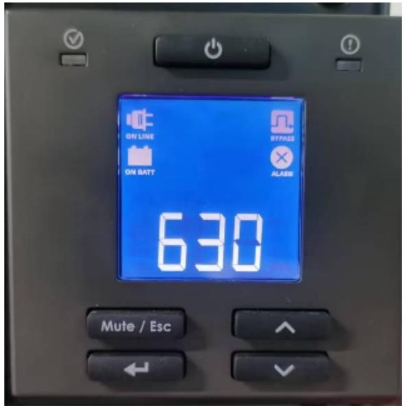
1. After installation, turn on the Easy-UPS. The Easy-UPS display screen will display a three digit code along with the Online, On Battery, Bypass, and Alarm symbols.
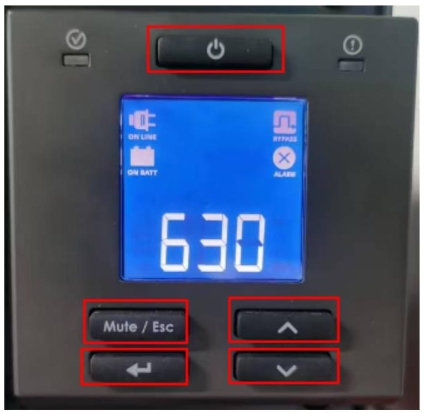
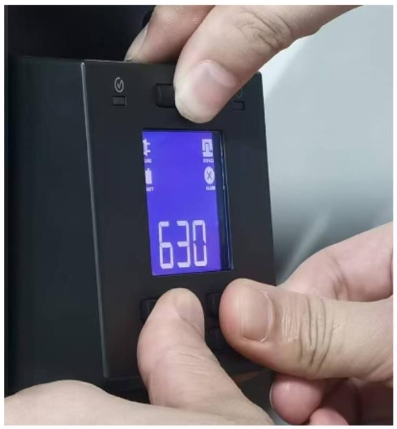
2. Press and hold the Power, Mute / Esc, Enter, Up, and Down buttons simultaneously for 5 seconds.
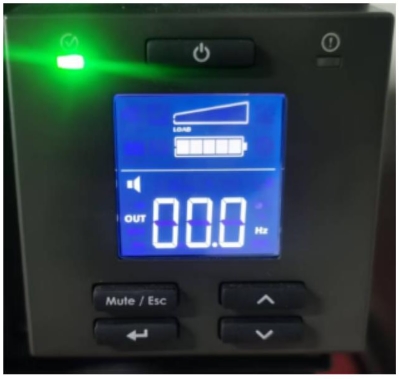
3. Once the buttons have been pressed for 5 seconds, the registration interface disappears and the normal interface appears.
4. The Easy-UPS can now be used but as this is temporary solution,this process will have to be repeated once the UPS restarts until the UPS has been successfully registered.
Easy-UPS Registration
If for some reason you are unable to complete the registration, follow the below process on how to temporarily bypass the registration process.
Process:
1. After installation, turn on the Easy-UPS. The Easy-UPS display screen will display a three digit code along with the Online, On Battery, Bypass, and Alarm symbols.
2. Press and hold the Power, Mute / Esc, Enter, Up, and Down buttons simultaneously for 5 seconds.
3. Once the buttons have been pressed for 5 seconds, the registration interface disappears and the normal interface appears.
4. The Easy-UPS can now be used but as this is temporary solution,this process will have to be repeated once the UPS restarts until the UPS has been successfully registered.