How can we help you today?

Harmony HMI "Your computer is low on memory" Error

From the Task Manager, check the memory usage of each application. If there is an application with an excessive usage, try to close it.

Also, it is possible to set up Virtual memory as well.
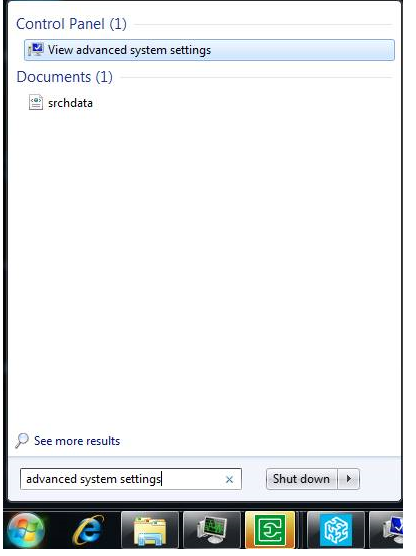
  1. Go to Control Panel->View advanced system settings (you can just type it from the Start bar).
Windows setting
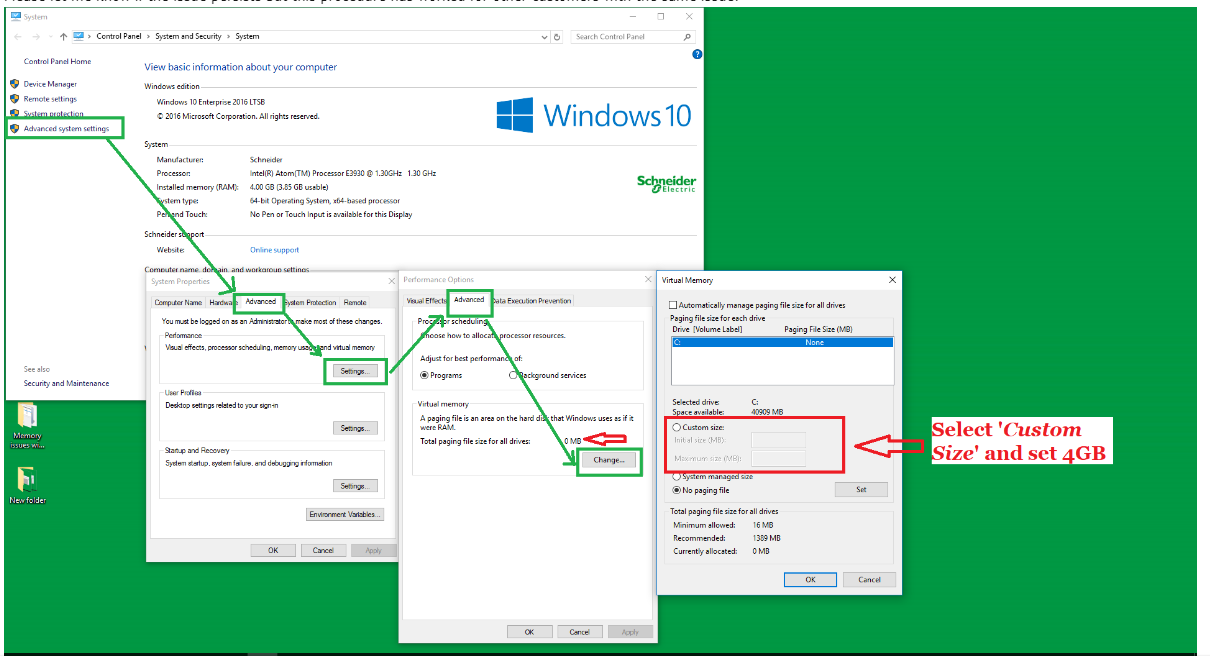
  1. Then in the System Properties dialog, go to the Advanced Tab.
  2. Under Performance, click on the Settings… button.
  3. In Performance Options dialog, go to the Advanced Tab.
  4. Under Virtual Memory, click on the Change… button.
  5. In the Virtual Memory dialog, untick the “Automatically manage paging file size for all drives” checkbox if it is ticked.
  6. Select C:\ from the list.
  7. Select “Custom size”.
  8. Assign 4GB (4096MB)
  9. Click OK.

Steps

Schneider Electric New Zealand

Users group

Discuss this topic with experts

Visit our Community for first-hand insights from experts and peers on this topic and more.

Need help?

Need help?

Product Selector

Product Selector

Quickly and easily find the right products and accessories for your applications.

Get a Quote

Get a Quote

Start your sales inquiry online and an expert will connect with you.

Where to buy?

Where to buy?

Easily find the nearest Schneider Electric distributor in your location.

Help Centre

Help Centre

Find support resources for all your needs, in one place.

  • Products Documentation
  • Software and Firmware
  • Product Selector
  • Product Substitution and Replacement
  • Help and Contact Centre
  • Where to Buy?
  • Office Locations
  • Schneider Electric, PDL & APC Phone: 0800 741 303
  • Schneider Electric Community
  • Careers
  • Company Profile
  • Report a misconduct
  • Newsroom
  • Investors
  • EcoStruxure
  • Job Search
  • Blog
  • Privacy Policy
  • Cookie Notice
  • Conditions of Sale
  • Change your cookie settings