


Hur kan vi hjälpa dig idag?
Video: How to modify the energy accumulation values on an ION meter
Issue
It may be required to set the energy readings of an ION meter to specific value. An example of this is when a meter swap out occurs, and the user wants to start the energy accumulation from the previous meter's readings.
Product Line
ION86xx series meters
ION76xx series meters
ION75xx series meters
PM8000 series meters
Environment
ION Setup
Resolution
ION Setup can be utilized with 'ION framework' meters to modify energy values.
For the ION setup download and documentation, please reference FA212816.
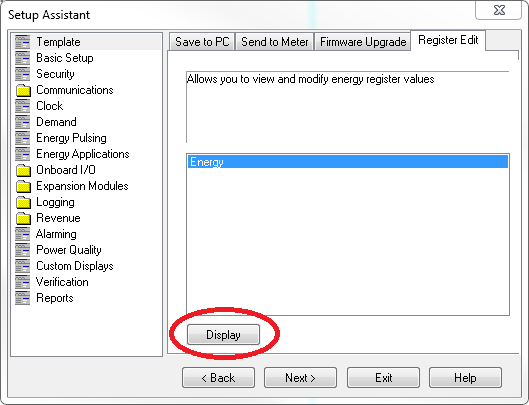
1. Within ION Setup, connect to the desired meter and open the Setup Assistant.
2. Select Template in the left hand pane of the Setup Assistant.
3. Select the Register Edit tab.
4. Under Register Edit, highlight Energy. With Energy selected, click the Display button.
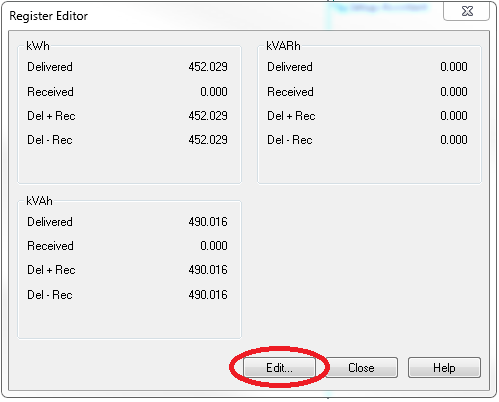
5. The Register Editor window will appear. Click Edit.
6. Enter the meter password and click OK. It is now possible to modify the Energy values.
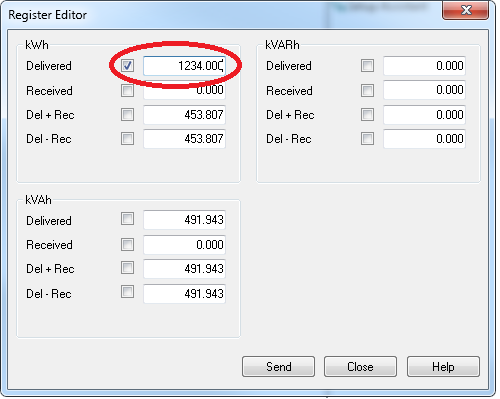
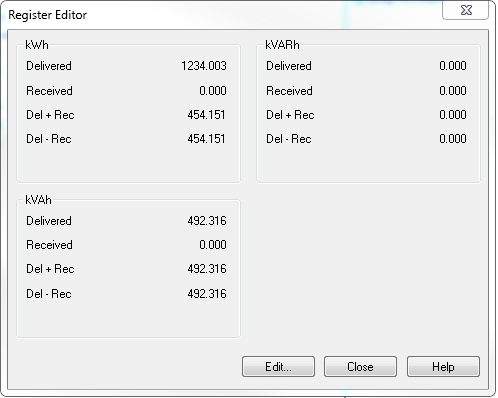
8. Once the desired values have been input, click 'Send'. (Ensure that the corresponding box is checked for each field that was modified.)
It may be required to set the energy readings of an ION meter to specific value. An example of this is when a meter swap out occurs, and the user wants to start the energy accumulation from the previous meter's readings.
Product Line
ION86xx series meters
ION76xx series meters
ION75xx series meters
PM8000 series meters
Environment
ION Setup
Resolution
ION Setup can be utilized with 'ION framework' meters to modify energy values.
For the ION setup download and documentation, please reference FA212816.
1. Within ION Setup, connect to the desired meter and open the Setup Assistant.
2. Select Template in the left hand pane of the Setup Assistant.
3. Select the Register Edit tab.
4. Under Register Edit, highlight Energy. With Energy selected, click the Display button.
5. The Register Editor window will appear. Click Edit.
6. Enter the meter password and click OK. It is now possible to modify the Energy values.
8. Once the desired values have been input, click 'Send'. (Ensure that the corresponding box is checked for each field that was modified.)
Publicerad för: Schneider Electric Sverige
Utforska mer
Produktfamilj
Utforska mer
Produktfamilj
Behöver du hjälp?
Produktväljare
Hitta snabbt och enkelt rätt produkter och tillbehör för dina ändamål.
Begär en offert
Ställ din fråga online så kontaktar vi dig.
Här köper du
Hitta enkelt närmaste Schneider Electric-distributör på din ort.
Hjälpcenter
Hitta alla supportresurser som du behöver på ett ställe.