


Hur kan vi hjälpa dig idag?
PME - Web Applications error when creating a new report subscription "An unexpected error has occurred. Your request cannot be processed at this time."
Issue
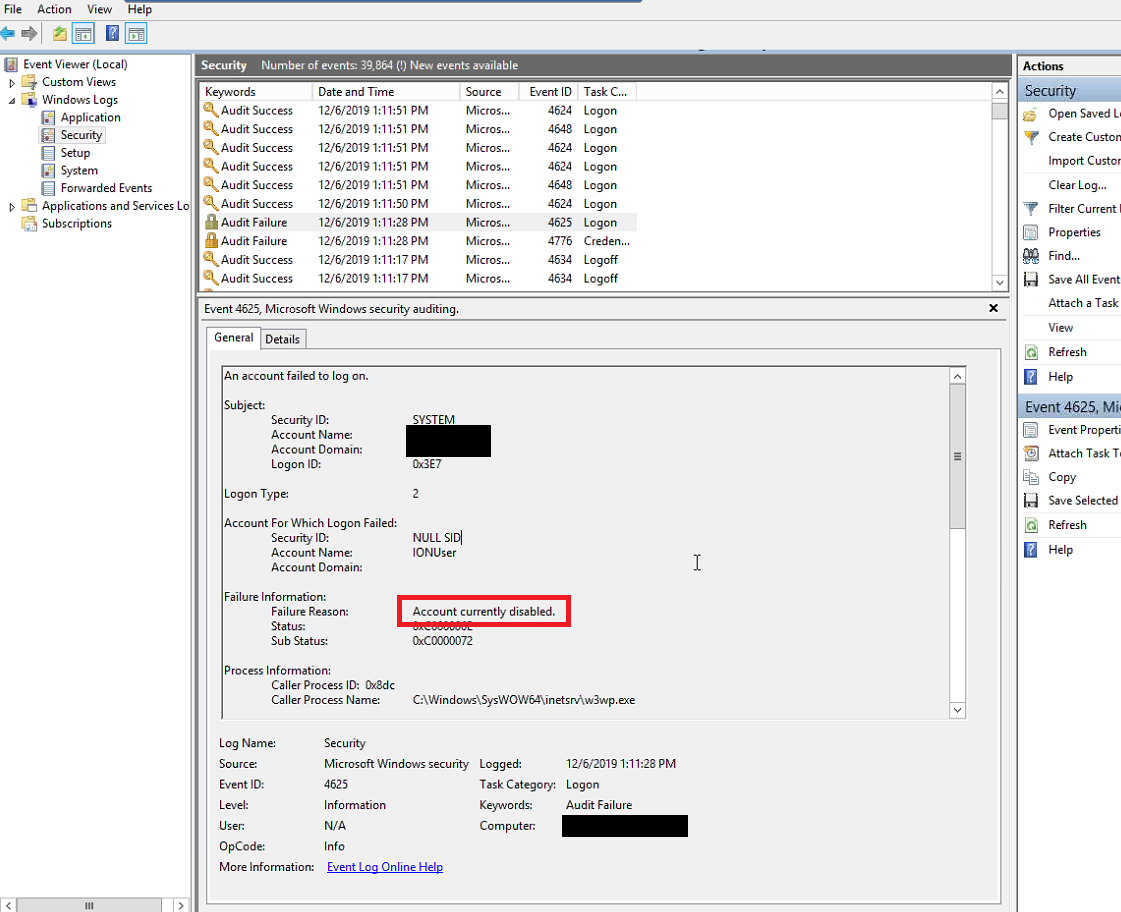
Adding a new report subscription in the PME Web Applications shows "An unexpected error has occurred. Your request cannot be processed at this time. If the problem persists, contact the Webpage administrator." The Windows Security log shows an "Audit Failure" entry and displays the following message: "Account currently disabled"
Product Line
Power Monitoring Expert 8.x
Power Monitoring Expert 9.0
Power Monitoring Expert 2020
Power Monitoring Expert 2021
Power Monitoring Expert 2022
Power Monitoring Expert 2023
Environment
Web Applications Reports
Cause
The IONUser is one of the Windows users automatically created during the installation of PME, and by default is the one used to run report subscriptions. If this user is disabled, then creating and/or running report subscriptions will result in an error.
Resolution
Make sure that the IONUser account is enabled.
Adding a new report subscription in the PME Web Applications shows "An unexpected error has occurred. Your request cannot be processed at this time. If the problem persists, contact the Webpage administrator." The Windows Security log shows an "Audit Failure" entry and displays the following message: "Account currently disabled"
Product Line
Power Monitoring Expert 8.x
Power Monitoring Expert 9.0
Power Monitoring Expert 2020
Power Monitoring Expert 2021
Power Monitoring Expert 2022
Power Monitoring Expert 2023
Environment
Web Applications Reports
Cause
The IONUser is one of the Windows users automatically created during the installation of PME, and by default is the one used to run report subscriptions. If this user is disabled, then creating and/or running report subscriptions will result in an error.
Resolution
Make sure that the IONUser account is enabled.
- Open Control Panel > Administrative Tools > Computer Management > Local Users and Groups > Users
- Right-Click IONUser > Properties
- Make sure the box next to "Account is disabled" is unchecked
Publicerad för: Schneider Electric Sverige
Utforska mer
Produktfamilj
Utforska mer
Produktfamilj
Behöver du hjälp?
Produktväljare
Hitta snabbt och enkelt rätt produkter och tillbehör för dina ändamål.
Begär en offert
Ställ din fråga online så kontaktar vi dig.
Här köper du
Hitta enkelt närmaste Schneider Electric-distributör på din ort.
Hjälpcenter
Hitta alla supportresurser som du behöver på ett ställe.