


Hur kan vi hjälpa dig idag?
Power Monitoring Expert v2020: Installation got struck while installing SE Floating License Manager (FLM)
Issue
While installing PME, it gets struck during installation of SE Floating License Manager (FLM).
Notice in below screen-cap in the installation UI 'Next' button is not enabled.
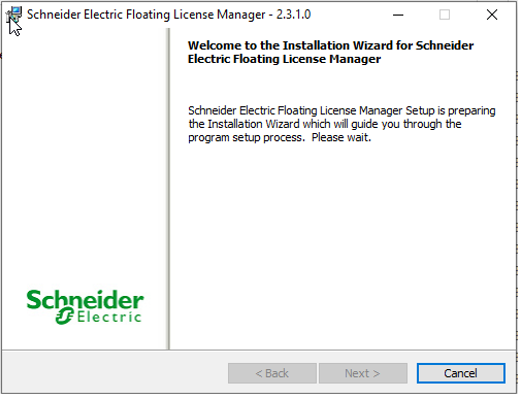
Also observed below error in Windows event > Application logs
Faulting application name: MsiExec.exe, version: 5.0.19041.1, time stamp: 0x25d5450e
Faulting module name: ISRT.dll, version: 23.0.0.511, time stamp: 0x5906b3e0
Exception code: 0xc0000005
Fault offset: 0x00095dd2
Faulting process id: 0x37cc
Faulting application start time: 0x01d6dcfc3840fcb3
Faulting application path: C:\Windows\syswow64\MsiExec.exe
Faulting module path: C:\Users\admin\AppData\Local\Temp\{0F08BE00-6415-4AE9-94D5-B21737FD11EA}\ISRT.dll
Report Id: 1557ef67-20f8-4a57-928c-bc256ab096af
Environment
Power Monitoring Expert v9.0 / v2020
Cause
User Account Control (UAC) security policy settings restricting SE FLM installer to halt/struck.
Resolution
> Lower the windows UAC settings as per below screen cap.

OR
> If above step didn’t fix the issue then install 3rd party WinZip/WinRar application and see if it fixes the issue.
While installing PME, it gets struck during installation of SE Floating License Manager (FLM).
Notice in below screen-cap in the installation UI 'Next' button is not enabled.
Also observed below error in Windows event > Application logs
Faulting application name: MsiExec.exe, version: 5.0.19041.1, time stamp: 0x25d5450e
Faulting module name: ISRT.dll, version: 23.0.0.511, time stamp: 0x5906b3e0
Exception code: 0xc0000005
Fault offset: 0x00095dd2
Faulting process id: 0x37cc
Faulting application start time: 0x01d6dcfc3840fcb3
Faulting application path: C:\Windows\syswow64\MsiExec.exe
Faulting module path: C:\Users\admin\AppData\Local\Temp\{0F08BE00-6415-4AE9-94D5-B21737FD11EA}\ISRT.dll
Report Id: 1557ef67-20f8-4a57-928c-bc256ab096af
Environment
Power Monitoring Expert v9.0 / v2020
Cause
User Account Control (UAC) security policy settings restricting SE FLM installer to halt/struck.
Resolution
> Lower the windows UAC settings as per below screen cap.
OR
> If above step didn’t fix the issue then install 3rd party WinZip/WinRar application and see if it fixes the issue.
Publicerad för: Schneider Electric Sverige
Utforska mer
Produktfamilj
Utforska mer
Produktfamilj
Behöver du hjälp?
Produktväljare
Hitta snabbt och enkelt rätt produkter och tillbehör för dina ändamål.
Begär en offert
Ställ din fråga online så kontaktar vi dig.
Här köper du
Hitta enkelt närmaste Schneider Electric-distributör på din ort.
Hjälpcenter
Hitta alla supportresurser som du behöver på ett ställe.