


How to change the SiteManager Token Domain for Windows target?
For some reason, if you need to change the token domain of one SiteManager on Windows Target, you cannot just update the Domain Token name and reconnect. In this case, the SiteManager will still try to connect to the previous Domain Token
The goal of this FAQ is to explain how to do it
This article is applicable for the part SiteManager of EcoStruxure Secure Connect Advisor on Windows target
To update the Domain Token, need to reset the SiteManager information
To do it, need to execute the batch file ReConfig SiteManager Embedded located in SiteManager folder
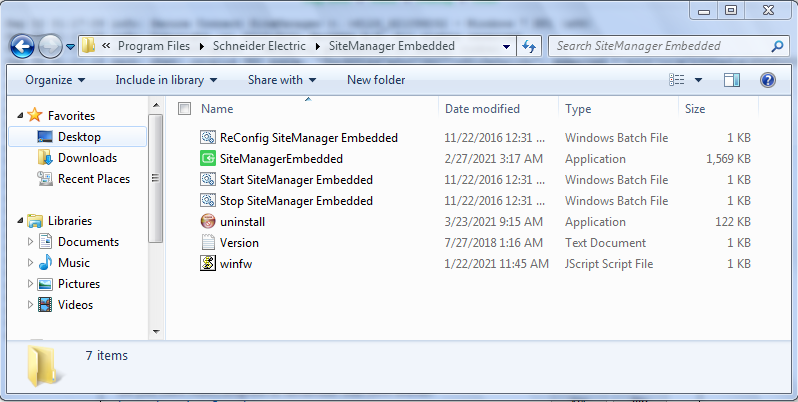
After executing the batch file, all information of SiteManager will be reset and you will be able to change the Domain token
The goal of this FAQ is to explain how to do it
This article is applicable for the part SiteManager of EcoStruxure Secure Connect Advisor on Windows target
To update the Domain Token, need to reset the SiteManager information
To do it, need to execute the batch file ReConfig SiteManager Embedded located in SiteManager folder
After executing the batch file, all information of SiteManager will be reset and you will be able to change the Domain token
Publicerad för: Schneider Electric Sverige
