


How to update the firmware of the Harmony STM6 Edge Box HMISTM6BOXIOT?
The goal of this FAQ is to explain how to update the firmware of the Harmony Edge Box HMI.
This article is applicable for HMISTM6BOXIOT.
To update the firmware of Harmony STM6 Edge Box HMI, need to follow some step (Last official update: V1.1.0).
Here the steps:
1 - Download the last software corresponding to the last official update: https://schneiderelectric.sharepoint.com/:f:/s/BoxSupportL3Group/EiO8SIa0xSVAgsXxTW6XbpEBgNU7lpMDlq0sEBs56UWWZg?e=RHI6zt
2 - Copy BOOTLD13.SYS and BOOTOS13.SYS to root of USB storage.
3 - Insert the USB flash disk in the USB port of HMISTM6BOXIOT.
4 - Connect to the configuration menu.
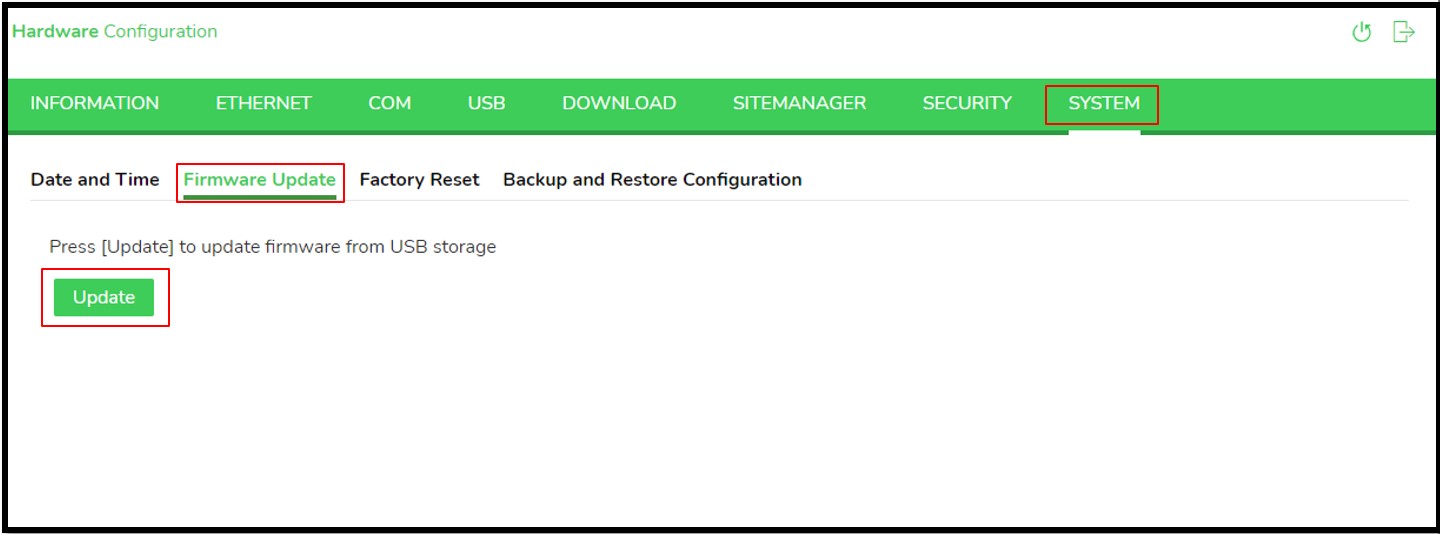
The duration to update the firmware is around 1 - 2 minutes.
After update the target will restart automatically.
This article is applicable for HMISTM6BOXIOT.
To update the firmware of Harmony STM6 Edge Box HMI, need to follow some step (Last official update: V1.1.0).
Here the steps:
1 - Download the last software corresponding to the last official update: https://schneiderelectric.sharepoint.com/:f:/s/BoxSupportL3Group/EiO8SIa0xSVAgsXxTW6XbpEBgNU7lpMDlq0sEBs56UWWZg?e=RHI6zt
2 - Copy BOOTLD13.SYS and BOOTOS13.SYS to root of USB storage.
3 - Insert the USB flash disk in the USB port of HMISTM6BOXIOT.
4 - Connect to the configuration menu.
The duration to update the firmware is around 1 - 2 minutes.
After update the target will restart automatically.
Publicerad för: Schneider Electric Sverige

Behöver du hjälp?
Produktväljare
Hitta snabbt och enkelt rätt produkter och tillbehör för dina ändamål.
Begär en offert
Ställ din fråga online så kontaktar vi dig.
Här köper du
Hitta enkelt närmaste Schneider Electric-distributör på din ort.
Hjälpcenter
Hitta alla supportresurser som du behöver på ett ställe.