


Where can I see the commercial reference of my wireless devices in EPC-m?
In EcoStruxure Power Commissioning Mobile application, during commissioning wireless devices, in case you want to see the commercial references of those devices, you can follow the steps mentioned below.
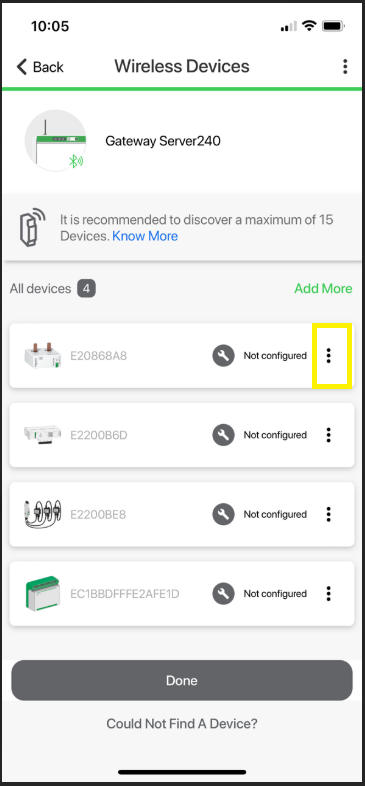
1) From “All devices” list shown in Pic 1, click on the three dots icon which is highlighted in the Pic 1
Pic 1
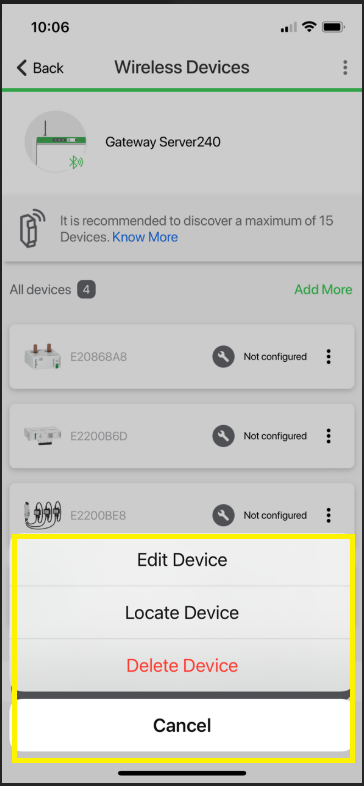
2) After clicking on the three dots menu, you will see a menu for editing, deleting, or locating the wireless devices as shown in Pic 2
Pic 2
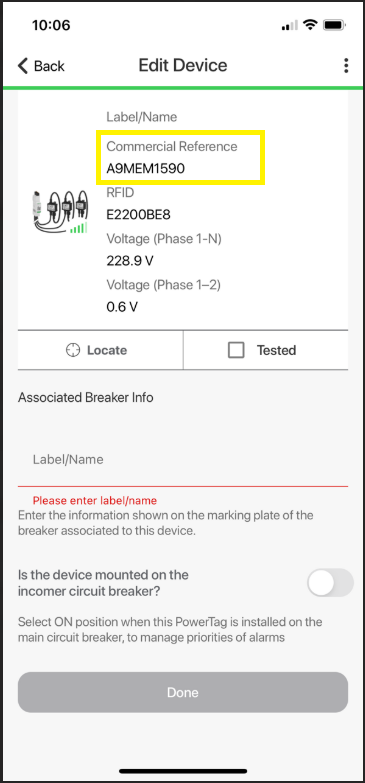
3) From the menu, please select “Edit Device” option and then you will see the Pic 3 from where you can see the commercial reference of the wireless devices
Pic 3
1) From “All devices” list shown in Pic 1, click on the three dots icon which is highlighted in the Pic 1
Pic 1
2) After clicking on the three dots menu, you will see a menu for editing, deleting, or locating the wireless devices as shown in Pic 2
Pic 2
3) From the menu, please select “Edit Device” option and then you will see the Pic 3 from where you can see the commercial reference of the wireless devices
Pic 3