


Where do I find the setting for Celsius or Fahrenheit selection within the AP9631 NMC2 Card
Issue:
Unable to find location of the setting for Celsius or Fahrenheit selection for AP9631, RPDU2, and NetBotz 250
Product line:
AP9630
AP9631
AP9635
RPDU2
NBRK0250
Environment:
5.x and 6.x firmware
Resolution:
Log into the NMC card and look at the top right side where you will see the following:
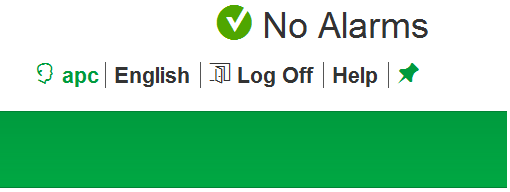
To change for the logged in user, click on the "apc" or currently logged in user option and you will see the following:
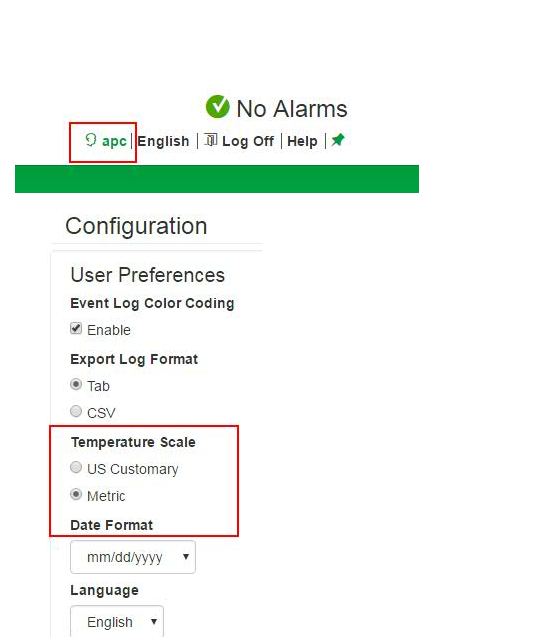
Select US Customary for Fahrenheit and Metric (default setting) for Celsius.
To change this setting for all users, Go to configuration --> security --> Local Users --> Default settings.
You will see similar settings options and again select US Customary for Fahrenheit or Metric for Celsius.
Unable to find location of the setting for Celsius or Fahrenheit selection for AP9631, RPDU2, and NetBotz 250
Product line:
AP9630
AP9631
AP9635
RPDU2
NBRK0250
Environment:
5.x and 6.x firmware
Resolution:
Log into the NMC card and look at the top right side where you will see the following:
To change for the logged in user, click on the "apc" or currently logged in user option and you will see the following:
Select US Customary for Fahrenheit and Metric (default setting) for Celsius.
To change this setting for all users, Go to configuration --> security --> Local Users --> Default settings.
You will see similar settings options and again select US Customary for Fahrenheit or Metric for Celsius.
Released for: Schneider Electric Singapore
