


Ako vám dnes môžeme pomôcť?
String value incorrectly shown as an integer in the OPC UA Sample Client.
Issue
String value incorrectly shown as an integer in the OPC UA Sample Client.
Product Line
OFS
Environment
Windows 10
Resolution
If you view the 'Node Attributes' for a symbol that is defined as a string, it is incorrectly shown as an integer in the
OPC UA Sample Client.
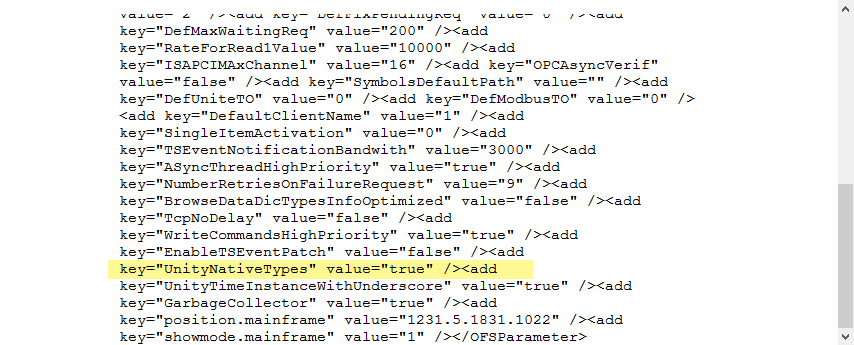
The following steps will demonstrate how to correct the issue:


String value incorrectly shown as an integer in the OPC UA Sample Client.
Product Line
OFS
Environment
Windows 10
Resolution
If you view the 'Node Attributes' for a symbol that is defined as a string, it is incorrectly shown as an integer in the
OPC UA Sample Client.
The following steps will demonstrate how to correct the issue:
- Navigate to 'C:\ProgramData\Schneider Electric\OFS\3.60.0.0'
- Open and edit the file named OFSInternal.xml' using 'wordpad'
- Locate the text "UnityNativeTypes" value="false"
- Change the text to "UnityNativeTypes" value="true"
- Save the changes.
- Run a test
Publikované pre: Schneider Electric Slovakia
Objavte viac
Rad:
Objavte viac
Rad:
Potrebujete pomoc?
Výber produktov
Rýchlo a jednoducho nájdite tie správne produkty a príslušenstvo pre vaše aplikácie.
Získať ponuku
Kontaktujte nás online a náš odborník sa s vami spojí.
Kde nakúpiť?
Jednoducho nájdite najbližšieho distribútora produktov Schneider Electric vo vašom okolí.
Centrum podpory
Nájdite zdroje podpory pre všetky vaše potreby na jednom mieste.