


Ako vám dnes môžeme pomôcť?
How to create a remote session on the HMIBSC via the Putty tool ?
Question
How to create a remote session on the HMIBSC via the Putty tool ?
Description
1- Install the Putty tool on your PC
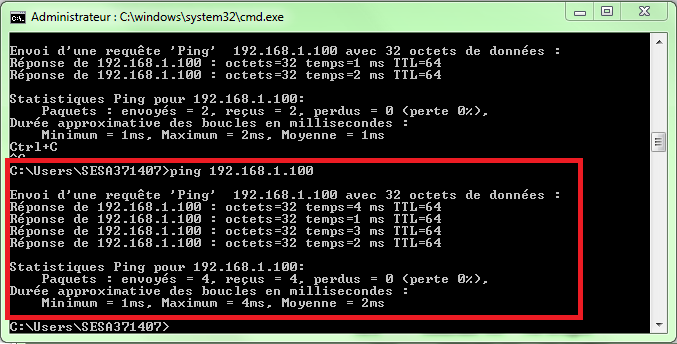
2- Check the connectivity with the HMIBSC target with the ping tool
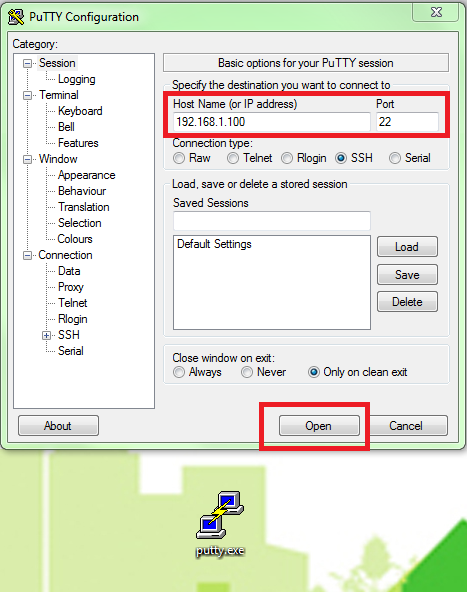
3- Configure and open the session with putty
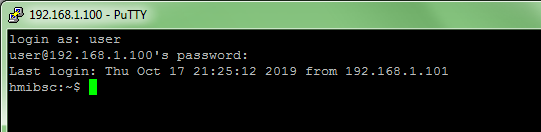
4- You can’t connect directly with the root account for security reasons.
You need to use a user account before ($ prefix).
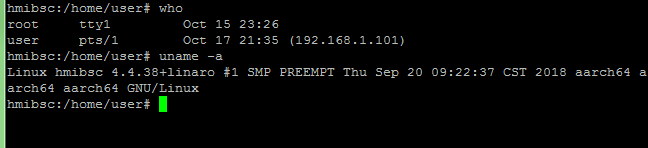
5- Now, it’s possible to login with the root account or to have the admin rights (# prefix)

6- You are connected on the HMIBSC
Keywords
HMIBSC, Magelis IIOT Box, Linux, SSH, remote session, Putty
Case author:
Lilian Cabos
Product Familly
Magelis IIOT Box
How to create a remote session on the HMIBSC via the Putty tool ?
Description
1- Install the Putty tool on your PC
2- Check the connectivity with the HMIBSC target with the ping tool
3- Configure and open the session with putty
4- You can’t connect directly with the root account for security reasons.
You need to use a user account before ($ prefix).
5- Now, it’s possible to login with the root account or to have the admin rights (# prefix)
6- You are connected on the HMIBSC
Keywords
HMIBSC, Magelis IIOT Box, Linux, SSH, remote session, Putty
Case author:
Lilian Cabos
Product Familly
Magelis IIOT Box
Publikované pre: Schneider Electric Slovakia
Objavte viac
Rad:
Objavte viac
Rad:
Potrebujete pomoc?
Výber produktov
Rýchlo a jednoducho nájdite tie správne produkty a príslušenstvo pre vaše aplikácie.
Získať ponuku
Kontaktujte nás online a náš odborník sa s vami spojí.
Kde nakúpiť?
Jednoducho nájdite najbližšieho distribútora produktov Schneider Electric vo vašom okolí.
Centrum podpory
Nájdite zdroje podpory pre všetky vaše potreby na jednom mieste.