


Чим ми можемо вам допомогти сьогодні?
How to manage the import/export of the Symbol list in EcoStruxure Machine Expert - Basic?
Depending on Microsoft Excel and Windows settings, the .csv file created when exporting the Symbol list from ESME-Basic* could not be displayed as expected in MS Excel.
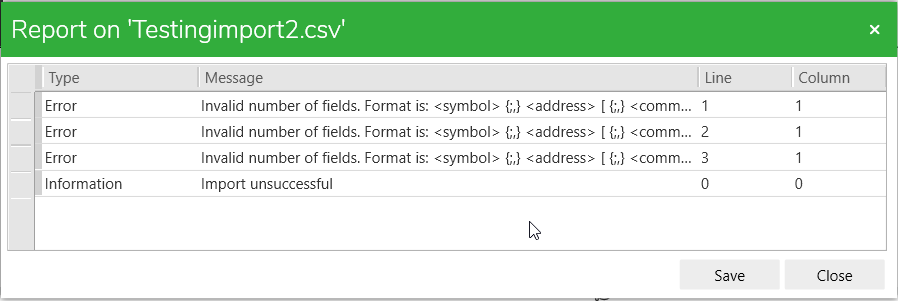
Likewise, we could get some errors when importing the Symbol list in ESME-Basic.
Example of error during the import:
Hereafter, a summary of the different combinations:
1) List Separator in Windows settings => Comma: “,”
Export options in ESME-Basic:
• Unicode + Semicolon => need to adapt in Excel by selecting semicolon as delimiter => save as .csv-utf8 file => import in ESME-Basic by selecting semicolon => Error
• Unicode + Comma => need to adapt in Excel by selecting comma as delimiter => save as .csv-utf8 file => import in ESME-Basic by selecting comma => OK
• ANSI + Semicolon => need to adapt in Excel by selecting semicolon as delimiter=> save as .csv file => import in ESME-Basic by selecting semicolon => Error
• ANSI + Comma => correctly displayed in Excel without doing any adaptation => save as .csv file => import in ESME-Basic by selecting comma => OK
2) List Separator in Windows settings => Semicolon: “;”
Export options in ESME-Basic:
• Unicode + Semicolon => need to adapt in Excel by selecting semicolon as delimiter=> save as .csv-utf8 file => import in ESME-Basic by selecting semicolon => OK
• Unicode + Comma => need to adapt in Excel by selecting comma as delimiter => save as .csv-utf8 file => import in ESME-Basic by selecting comma => Error
• ANSI + Semicolon => correctly displayed in Excel without doing any adaptation => save as .csv file => import in ESME-Basic by selecting semicolon => OK
• ANSI + Comma => need to adapt in Excel by selecting comma as delimiter=> save as .csv file => import in ESME-Basic by selecting comma => Error
Through these different tests, we can see the error appears when the list separator of Windows is different from the separator selected in ESME-Basic.
When handling Unicode file, take care to select csv-utf8 format when saving as the .csv file in MS Excel.
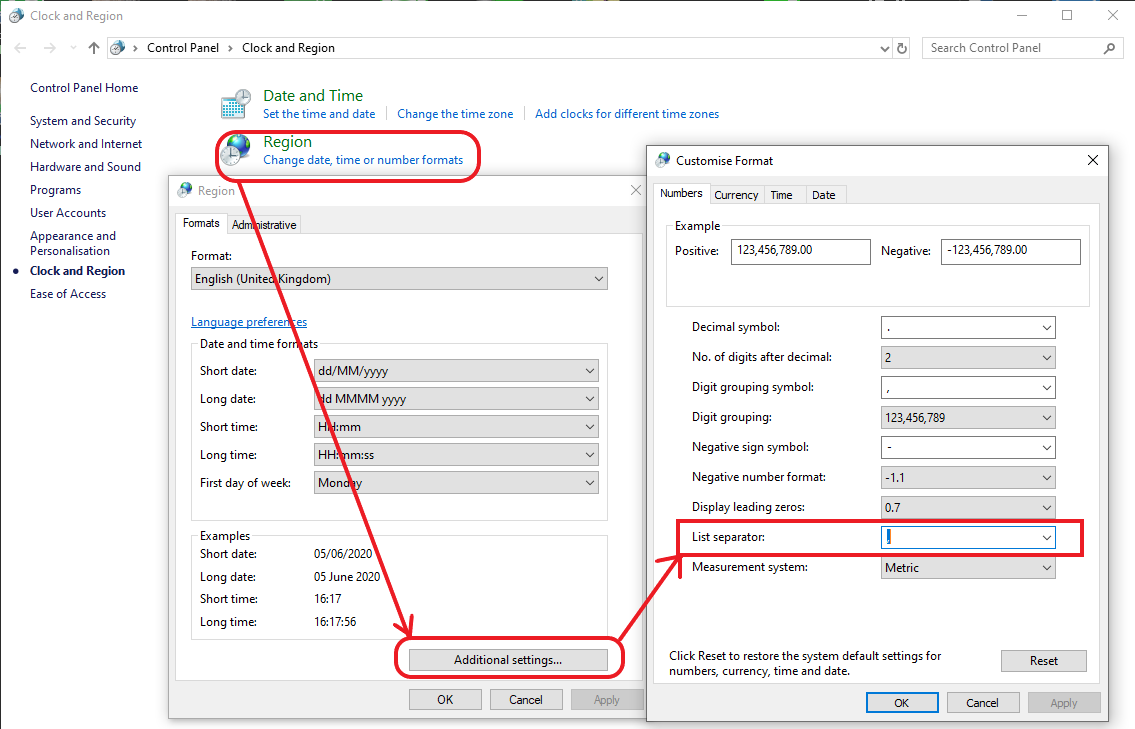
Note 1: How to change the List separator in Windows?
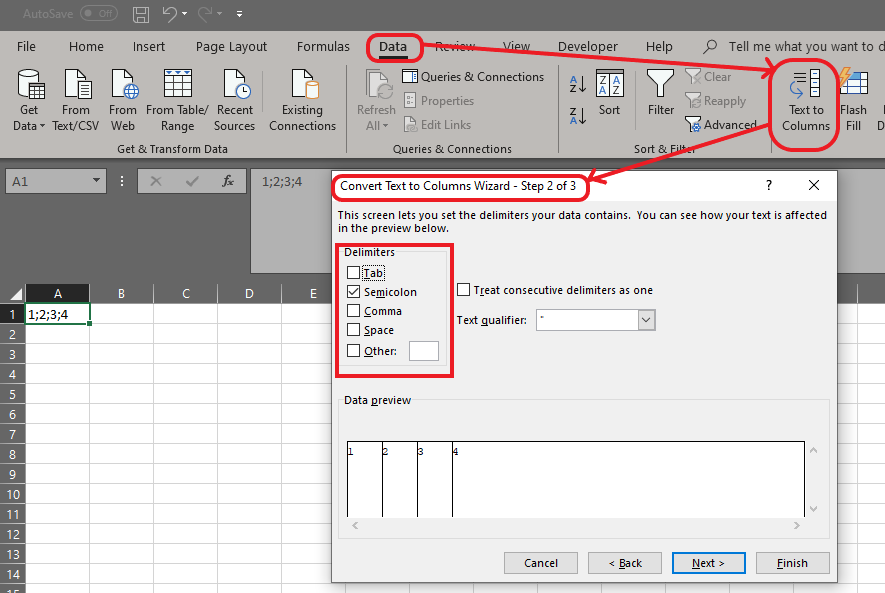
Note 2: How to change the Delimiter in MS Excel?
*ESME-Basic: EcoStruxure Machine Expert - Basic
Likewise, we could get some errors when importing the Symbol list in ESME-Basic.
Example of error during the import:
Hereafter, a summary of the different combinations:
1) List Separator in Windows settings => Comma: “,”
Export options in ESME-Basic:
• Unicode + Semicolon => need to adapt in Excel by selecting semicolon as delimiter => save as .csv-utf8 file => import in ESME-Basic by selecting semicolon => Error
• Unicode + Comma => need to adapt in Excel by selecting comma as delimiter => save as .csv-utf8 file => import in ESME-Basic by selecting comma => OK
• ANSI + Semicolon => need to adapt in Excel by selecting semicolon as delimiter=> save as .csv file => import in ESME-Basic by selecting semicolon => Error
• ANSI + Comma => correctly displayed in Excel without doing any adaptation => save as .csv file => import in ESME-Basic by selecting comma => OK
2) List Separator in Windows settings => Semicolon: “;”
Export options in ESME-Basic:
• Unicode + Semicolon => need to adapt in Excel by selecting semicolon as delimiter=> save as .csv-utf8 file => import in ESME-Basic by selecting semicolon => OK
• Unicode + Comma => need to adapt in Excel by selecting comma as delimiter => save as .csv-utf8 file => import in ESME-Basic by selecting comma => Error
• ANSI + Semicolon => correctly displayed in Excel without doing any adaptation => save as .csv file => import in ESME-Basic by selecting semicolon => OK
• ANSI + Comma => need to adapt in Excel by selecting comma as delimiter=> save as .csv file => import in ESME-Basic by selecting comma => Error
Through these different tests, we can see the error appears when the list separator of Windows is different from the separator selected in ESME-Basic.
When handling Unicode file, take care to select csv-utf8 format when saving as the .csv file in MS Excel.
Note 1: How to change the List separator in Windows?
Note 2: How to change the Delimiter in MS Excel?
*ESME-Basic: EcoStruxure Machine Expert - Basic
Опубліковано для: Schneider Electric Україна
Досліджуйте більше
Серія:
Досліджуйте більше
Серія:
Потрібна допомога?
Почніть тут!
Знайдіть відповіді зараз. Шукайте рішення самостійно або зверніться до нашого експерта.
Звернутися до служби підтримки
Якщо вам потрібна допомога, додаткова інформація чи технічна підтримка або ви хочете подати скаргу, зв’яжіться з нашою командою з обслуговування клієнтів.
Де придбати?
Зручний пошук найближчого дистриб’ютора, магазина або спеціалізованого партнера Schneider Electric у вашому регіоні.
Переглянути відповіді на поширені запитання
Отримайте необхідну інформацію, переглянувши відповіді на поширені запитання за відповідними темами.