


Чим ми можемо вам допомогти сьогодні?
How can I read %I/Q or %M on my M221, M241, M251, M262, M258 or LMC058 controller using Modbus ?
2 cases have to be considered: M221 or (M241, M251, M262, M258 and LMC058).
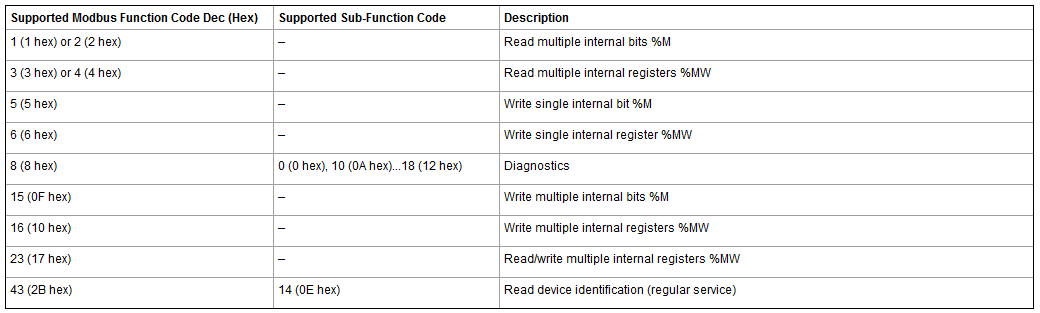
M221 :
%M (internal bits) can be accessed using function codes from the table below (extracted from Machine Expert - Basic online help).
Note that %I (physical inputs) and %Q (physical outputs) can not be accessed directly by Modbus.
M241, M251, M262, M258 and LMC058:
%M (internal bits) cannot be accessed by Modbus.
But %I (physical inputs) and %Q (physical outputs) can be accessed using function codes from the table below (extracted from Machine Expert online help).
M221 :
%M (internal bits) can be accessed using function codes from the table below (extracted from Machine Expert - Basic online help).
Note that %I (physical inputs) and %Q (physical outputs) can not be accessed directly by Modbus.
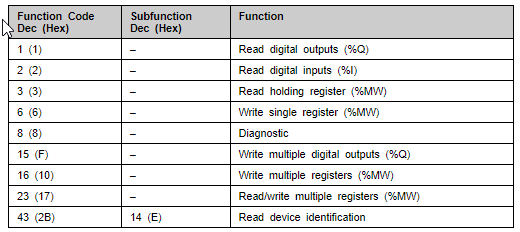
M241, M251, M262, M258 and LMC058:
%M (internal bits) cannot be accessed by Modbus.
But %I (physical inputs) and %Q (physical outputs) can be accessed using function codes from the table below (extracted from Machine Expert online help).
Опубліковано для: Schneider Electric Україна
Досліджуйте більше
Серія:
Досліджуйте більше
Серія:
Потрібна допомога?
Почніть тут!
Знайдіть відповіді зараз. Шукайте рішення самостійно або зверніться до нашого експерта.
Звернутися до служби підтримки
Якщо вам потрібна допомога, додаткова інформація чи технічна підтримка або ви хочете подати скаргу, зв’яжіться з нашою командою з обслуговування клієнтів.
Де придбати?
Зручний пошук найближчого дистриб’ютора, магазина або спеціалізованого партнера Schneider Electric у вашому регіоні.
Переглянути відповіді на поширені запитання
Отримайте необхідну інформацію, переглянувши відповіді на поширені запитання за відповідними темами.