


Чим ми можемо вам допомогти сьогодні?
SESU returns the message 'An error was detected during the update check'.
Issue
SESU returns the message 'An error was detected during the update check.
Product Line
SESU
Environment
Windows 10
Resolution
SESU returns the message 'An error was detected during the update check. A service system error was encountered: No such Collection in persistent storage [1,7E0,8,1[730000A2,0,400A2731][73000001,0,400A273D]]'

This could occur if the 'Net.Pipe.Listener.Adapter' .service is not running.
The SESU log will also show a message similar to the the following:
2018-02-05 11:51:46,702 [8152/ 1] INFO TrySendCommandLine: exception caught, type=System.ServiceModel.EndpointNotFoundException, Message=There was no endpoint listening at net.pipe://localhost/Sesu_elekeb_Session1 that could accept the message. This is often caused by an incorrect address or SOAP action. See InnerException, if present, for more details. (TrySendCommandLine, line 0)
To resolve the issue: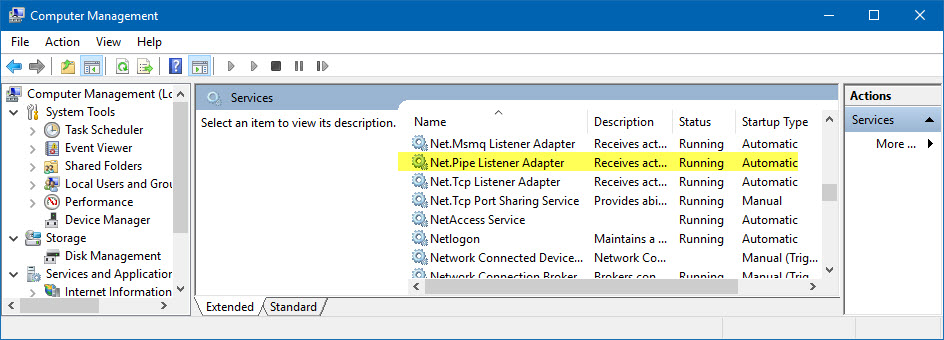

SESU returns the message 'An error was detected during the update check.
Product Line
SESU
Environment
Windows 10
Resolution
SESU returns the message 'An error was detected during the update check. A service system error was encountered: No such Collection in persistent storage [1,7E0,8,1[730000A2,0,400A2731][73000001,0,400A273D]]'
This could occur if the 'Net.Pipe.Listener.Adapter' .service is not running.
The SESU log will also show a message similar to the the following:
2018-02-05 11:51:46,702 [8152/ 1] INFO TrySendCommandLine: exception caught, type=System.ServiceModel.EndpointNotFoundException, Message=There was no endpoint listening at net.pipe://localhost/Sesu_elekeb_Session1 that could accept the message. This is often caused by an incorrect address or SOAP action. See InnerException, if present, for more details. (TrySendCommandLine, line 0)
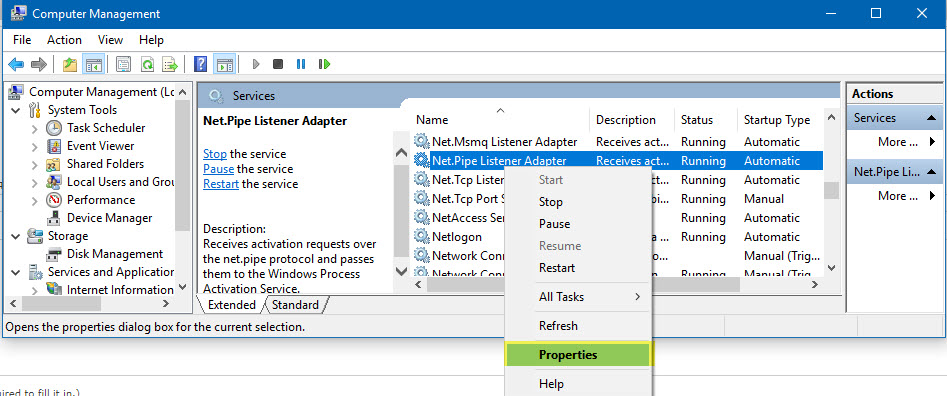
To resolve the issue:
- Open the 'Computer Management' console.
- Open the 'Services'.
- Right click on the service and select 'Properties'.
- Sett he 'Startup Type' to A'utomatic'.
- Start the 'Net.Pipe.Listener.Adapter' .service on the windows operating system
- Click OK
Опубліковано для: Schneider Electric Україна
Досліджуйте більше
Серія:
Досліджуйте більше
Серія:
Потрібна допомога?
Почніть тут!
Знайдіть відповіді зараз. Шукайте рішення самостійно або зверніться до нашого експерта.
Звернутися до служби підтримки
Якщо вам потрібна допомога, додаткова інформація чи технічна підтримка або ви хочете подати скаргу, зв’яжіться з нашою командою з обслуговування клієнтів.
Де придбати?
Зручний пошук найближчого дистриб’ютора, магазина або спеціалізованого партнера Schneider Electric у вашому регіоні.
Переглянути відповіді на поширені запитання
Отримайте необхідну інформацію, переглянувши відповіді на поширені запитання за відповідними темами.