


Чим ми можемо вам допомогти сьогодні?
How to create a remote session on the HMIBSC via the Putty tool ?
Question
How to create a remote session on the HMIBSC via the Putty tool ?
Description
1- Install the Putty tool on your PC
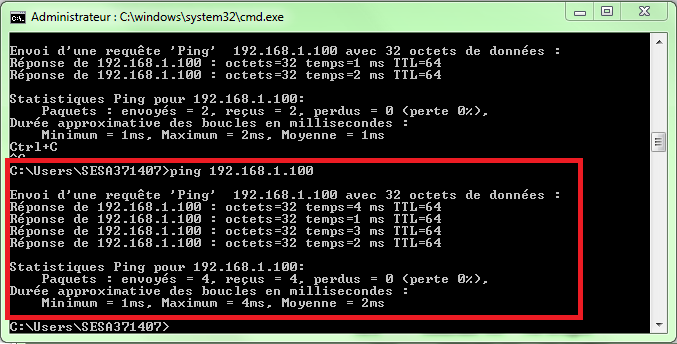
2- Check the connectivity with the HMIBSC target with the ping tool
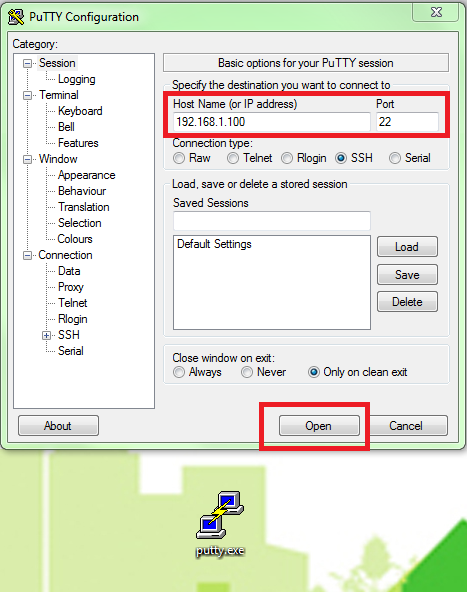
3- Configure and open the session with putty
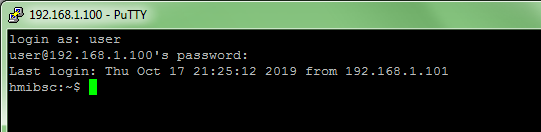
4- You can’t connect directly with the root account for security reasons.
You need to use a user account before ($ prefix).
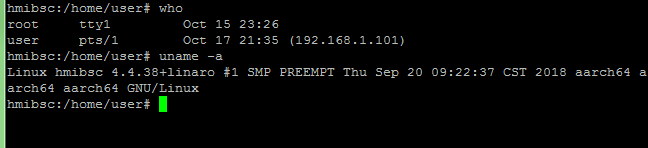
5- Now, it’s possible to login with the root account or to have the admin rights (# prefix)

6- You are connected on the HMIBSC
Keywords
HMIBSC, Magelis IIOT Box, Linux, SSH, remote session, Putty
Case author:
Lilian Cabos
Product Familly
Magelis IIOT Box
How to create a remote session on the HMIBSC via the Putty tool ?
Description
1- Install the Putty tool on your PC
2- Check the connectivity with the HMIBSC target with the ping tool
3- Configure and open the session with putty
4- You can’t connect directly with the root account for security reasons.
You need to use a user account before ($ prefix).
5- Now, it’s possible to login with the root account or to have the admin rights (# prefix)
6- You are connected on the HMIBSC
Keywords
HMIBSC, Magelis IIOT Box, Linux, SSH, remote session, Putty
Case author:
Lilian Cabos
Product Familly
Magelis IIOT Box
Опубліковано для: Schneider Electric Україна
Досліджуйте більше
Серія:
Досліджуйте більше
Серія:
Потрібна допомога?
Почніть тут!
Знайдіть відповіді зараз. Шукайте рішення самостійно або зверніться до нашого експерта.
Звернутися до служби підтримки
Якщо вам потрібна допомога, додаткова інформація чи технічна підтримка або ви хочете подати скаргу, зв’яжіться з нашою командою з обслуговування клієнтів.
Де придбати?
Зручний пошук найближчого дистриб’ютора, магазина або спеціалізованого партнера Schneider Electric у вашому регіоні.
Переглянути відповіді на поширені запитання
Отримайте необхідну інформацію, переглянувши відповіді на поширені запитання за відповідними темами.