


How can you define a product as favorite in EcoStruxure Power Build Easy Series application
Issue: Mark your product as favorite to save time while configuring a product.
Product Line: EcoStruxure Power Build easy Series.
Resolution:
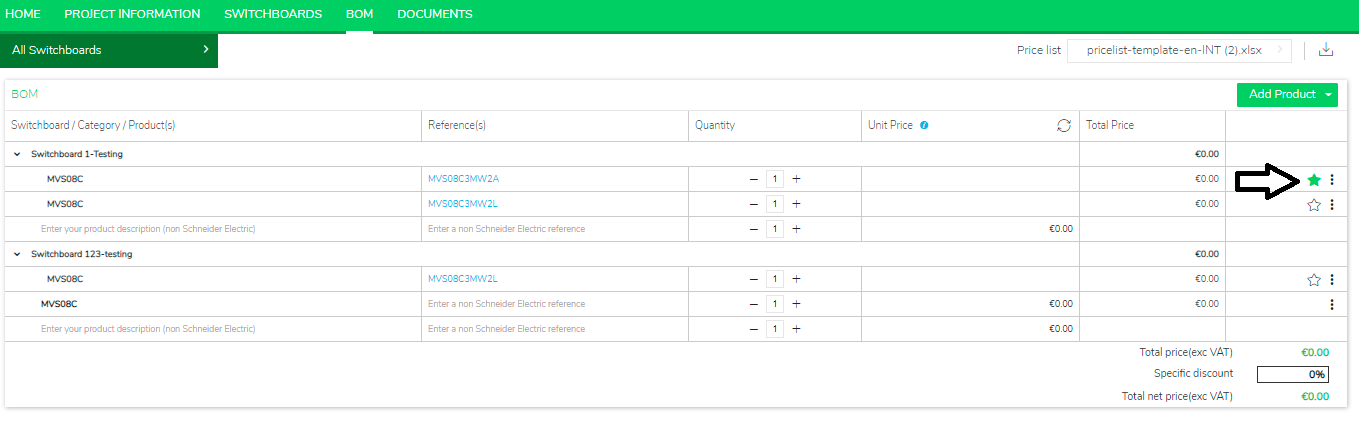
After adding a product to the product list, you can set it as a favorite by clicking on the star on the right. Once the star is clicked and appears green, the product will appear in the ‘Favorites’ tab of the product selection pop-up.
Product Line: EcoStruxure Power Build easy Series.
Resolution:
After adding a product to the product list, you can set it as a favorite by clicking on the star on the right. Once the star is clicked and appears green, the product will appear in the ‘Favorites’ tab of the product selection pop-up.
Released for: Schneider Electric UK
