


EcoStruxure Machine Expert HVAC - How to solve the error A4107 => Function not found ?
If when we compile the application on EcoStruxure Machine Expert HVAC and we found this error code A4107 next to some function like:
- error A4107: _FADD => Function not found
- error A4107: _FSUB => Function not found
- error A4107: _FMUL => Function not found
- error A4107: _UI_TO_FLOAT => Function not found
- error A4107: _DO_FLOAT_DIV => Function not found
- error A4107: _DO_FLOAT_LT => Function not found
- error A4107: _DO_FLOAT_GT => Function not found
- error A4107: _DO_FLOAT_NE => Function not found
- error A4107: _DO_FLOAT_EQ => Function not found
- error A4107: _DO_FLOAT_GE => Function not found
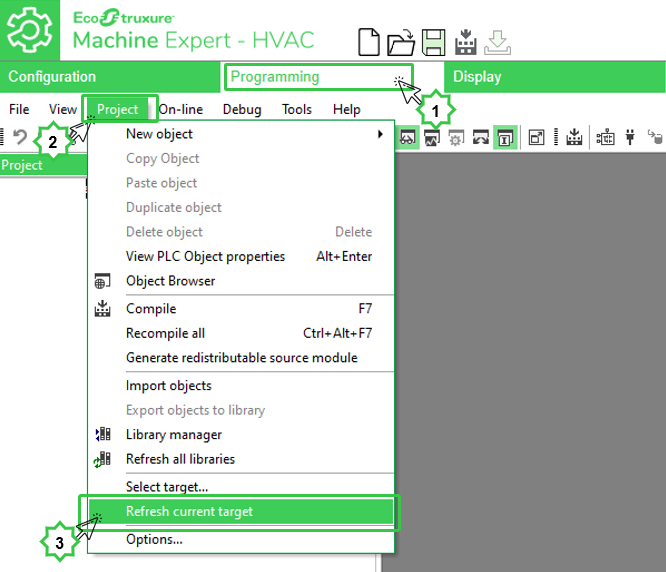
Then we need to "Refresh" our current controller so :
1) Go to the "Programming Tab".
2) Select to "Project"
3) Then select "Refresh current target"
- error A4107: _FADD => Function not found
- error A4107: _FSUB => Function not found
- error A4107: _FMUL => Function not found
- error A4107: _UI_TO_FLOAT => Function not found
- error A4107: _DO_FLOAT_DIV => Function not found
- error A4107: _DO_FLOAT_LT => Function not found
- error A4107: _DO_FLOAT_GT => Function not found
- error A4107: _DO_FLOAT_NE => Function not found
- error A4107: _DO_FLOAT_EQ => Function not found
- error A4107: _DO_FLOAT_GE => Function not found
Then we need to "Refresh" our current controller so :
1) Go to the "Programming Tab".
2) Select to "Project"
3) Then select "Refresh current target"
Released for: Schneider Electric UK
